
Appearance
LUCIA — Your Podcast Assistant
Open Chat in the sidebar to work with LUCIA. It can use the selected podcast's positioning, keywords, rankings, competitors, and episode plans to answer questions and make supported changes in PodSEO.
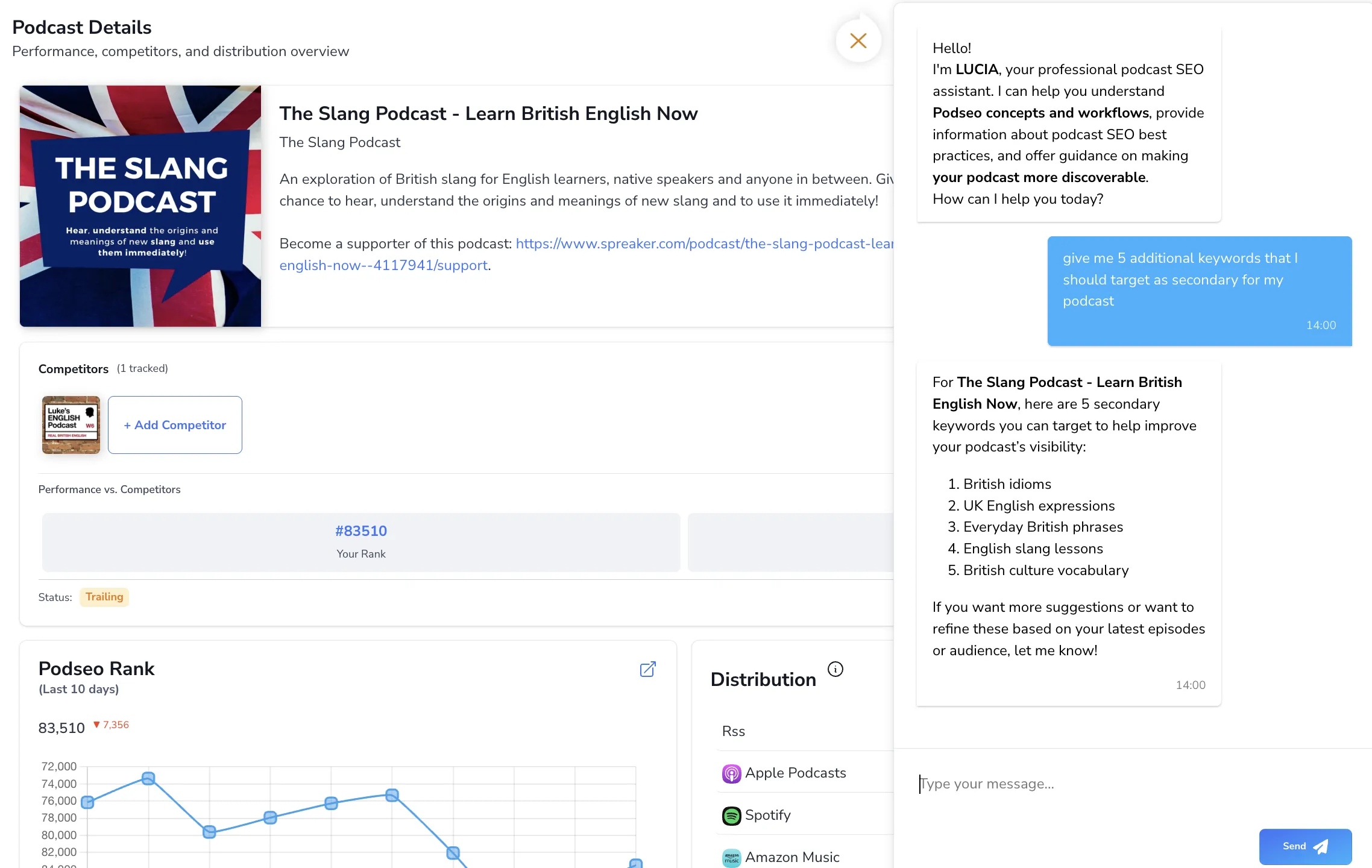
Start with the right podcast
Select your podcast and, if applicable, your organization account before opening chat. Name the episode or keyword when a request could apply to several items. A useful first request is: “Summarize my current keyword strategy and tell me which three changes to consider next.”
Ask about your data
LUCIA can help explain rankings and their history, metadata alignment, competitor overlap, distribution issues, AI visibility, reviews, and plan allowances. You can also ask about credit usage or the status of clip creation.
Ask for the platform and period behind a comparison: “Which of my tracked keywords dropped on Spotify?” is more actionable than “Why am I not growing?” If the data is incomplete, inspect the relevant feature page before drawing a conclusion.
Ask LUCIA to make changes
You can request actions as well as advice:
| Task | Example request |
|---|---|
| Track keywords | “Add beginner investing and retirement planning as Monitored keywords.” |
| Change keyword tiers | “Move retirement planning to Primary.” |
| Stop tracking | “Stop tracking the keyword daily stock picks.” |
| Organize groups | “Create a Retirement group and add my retirement planning keyword.” |
| Update positioning | “Update my target audience to first-time investors in their thirties.” |
| Create an episode plan | “Create an idea for an episode about building an emergency fund.” |
| Edit a plan | “Move the emergency fund episode to next Friday and update its description.” |
| Manage existing plans | “Duplicate this episode plan,” or “Link this plan to the published episode.” |
| Reschedule plans | “Move my overdue episode plans to next week.” |
| Target episode keywords | “Add retirement planning as a target keyword for the emergency fund episode.” |
| Add competitors | “Add The Money Hour as a competitor.” |
| Manage PR outreach | “Add this newsletter to my outreach pipeline and remind me to follow up next Tuesday.” |
| Act on recommendations | “Dismiss the recommendation about my show description,” or “Mark the artwork recommendation as done.” |
| Review collection | “Start collecting reviews for my podcast.” |
| Refresh your feed | “Refresh my RSS feed so the new episode shows up.” |
| Notification settings | “Send Pulse news in my weekly digest instead of as it happens.” |
| Send feedback | “Tell the PodSEO team the calendar view should show time zones.” |
Be explicit about whether you want suggestions or saved changes. Review the result in Keyword Strategy, Show Rankings, Positioning, or Planner after an action. A title LUCIA proposes in chat isn't saved until you see the action result — check the record to be sure.
LUCIA follows the same access and plan limits as the app. It cannot bypass the three-Primary limit, your total keyword allowance, paid episode features, podcast assignments, or approval requirements. Archiving a linked or published plan requires resolving its link first.
What changes outside PodSEO?
Saving a plan or changing keywords in PodSEO does not update your podcast host, rewrite the live RSS feed, or publish an episode. Apply approved title and description changes in your host separately. Use Social Publishing to review and schedule social posts, and Agency approvals for client sign-off.
Availability and limits
LUCIA has a monthly message allowance based on your plan:
| Plan | Messages per month |
|---|---|
| Free | 5 |
| Podcaster | 300 |
| Producer | 1,000 |
| Agency | 10,000 |
| Enterprise | See your plan or contact us |
Ask LUCIA about your current allowance, or check your account when you encounter a limit. Clip-generation credits are a separate allowance; see Billing and Account Settings.
In a team, use your own login and the correct organization context. Share only information needed for the task, and check the current privacy policy for how the service handles conversation data. LUCIA's answers can be mistaken: verify important recommendations and distinguish an observed ranking change from proof of its cause.
If an action fails
Read the response for the affected item and limit. Check the selected podcast, your permissions, and available capacity, then open the feature directly to confirm its state before retrying. For a persistent issue, contact PodSEO through Settings → Contact Us with the request and the affected podcast.