
Appearance
Show Visibility
Track Your Podcast's Organic Search Performance
Show Visibility reveals where your podcast appears when people search for keywords on major platforms (Apple Podcasts, Spotify, Amazon Music, YouTube Music). Each number shows your podcast's ranking position for that keyword - lower numbers indicate better rankings.
In the app, this is the show view of the Organic Visibility tab (the tab is labeled "Organic Visibility" in the Search Visibility navigation). The same tab also has an episode view—see Episode Visibility—but this article covers the show-level view.
Why This Matters: Show Visibility works as an opportunistic discovery tool, showing where your podcast is ALREADY ranking across platforms. The biggest traffic boost comes from reaching the top 3-5 results, so use this feature to identify keywords where you're close (#6-10) and can realistically push into high-visibility positions with targeted optimization.
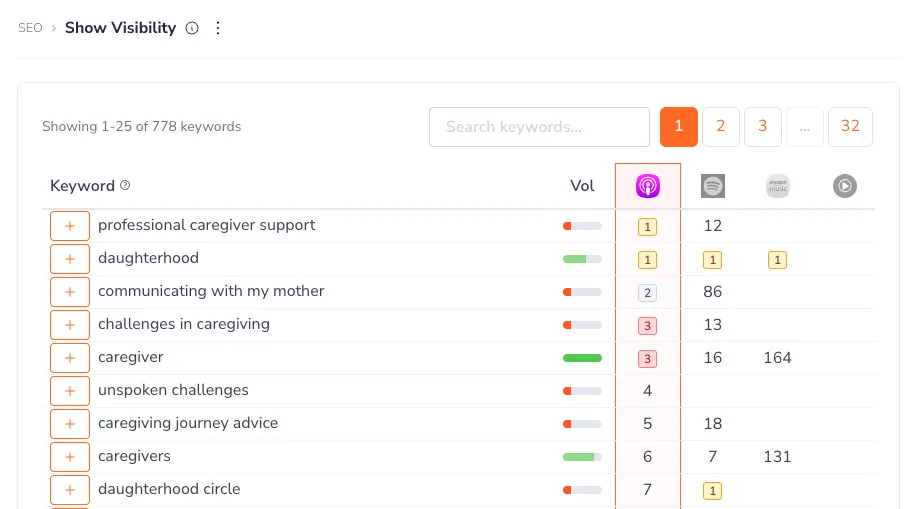
Free Plan Note: Free users see every row in the table. Your 3 best-ranked keywords are shown in full; every other row keeps its ranking positions and search volume meter, but the keyword itself is replaced with "Upgrade to See Keyword" and a lock symbol. Upgrading reveals every keyword.
The Strategic Value of Keyword Ranking Data
Turn Visibility Into Discovery
Rankings aren't just numbers - they represent real discovery opportunities. Since most listeners choose from the top 3-5 results, improving from #8 to #4 can dramatically increase how many people find your show. The key is identifying where you're already close to these high-visibility positions and optimizing strategically.
The Opportunistic Approach to Keyword Optimization
Show Visibility reveals where you're ALREADY appearing in search results. Use this data opportunistically:
- High-Impact Targets: Keywords where you rank #6-10 - closest to the high-visibility top 5 positions
- Current Strengths: Keywords where you already rank top 5 - maintain and reinforce these wins
- Platform-Specific Gaps: Keywords ranking well on one platform but not others - cross-platform optimization opportunities
Key Features
Summary Stat Cards: At the top of the page, Top 50 visibility shows how many qualifying keywords your podcast ranks for in the top 50 on at least one platform. Next to it, per-platform cards show how many keywords rank in the top 50 on Apple Podcasts, on Spotify, and on Amazon + YouTube (Amazon Music and YouTube Music combined).
Keyword Rankings Table: Displays keywords your podcast ranks for, showing the keyword text, search volume, and your ranking position on each platform. Only keywords where your podcast ranks within the top 50 appear here.
Platform Rankings: Shows ranking position for each keyword on Apple Podcasts, Spotify, Amazon Music, and YouTube Music
Search Volume: A 6-step green meter showing roughly how many times a month people search for each keyword, as one of six levels: Very niche (under 100), Niche (100–250), Small (250–1K), Medium (1K–2.5K), Popular (2.5K–10K), and Very popular (10K+). Hover over the meter (or focus it) to see the level and range, for example "Small · 250–1K searches/mo". A clock icon means the keyword hasn't been measured yet.
Volume Filter: Use the volume-level chips above the table to show or hide keywords by search volume, for example to focus on Niche keywords you can win quickly or on Popular ones with more reach
Track Keywords: Click the "Track" button to add keywords to your Keyword Strategy for monitoring
Sortable Columns: Click platform headers to sort by ranking position - lower numbers mean better visibility
How to Use Show Visibility Strategically
Step 1: Find Your Opportunistic Wins
Focus on Where You're Already Close: The biggest traffic boost comes from reaching the top 3-5 results on each platform. Look for keywords where you already rank in positions #6-15 - these represent realistic opportunities to push into the high-visibility zone with focused optimization.
Step 2: Understand Platform-Specific Performance
Sort by Platform: Click platform column headers (Apple Podcasts, Spotify, etc.) to identify where your optimization efforts should focus. You might rank well on Apple but poorly on Spotify for the same keyword.
Step 3: Use It as an Opportunistic Discovery Tool
Analyze Where You're Already Ranking: Show Visibility shows where your podcast is currently appearing in search results. Use this data to identify:
- High-Priority Opportunities: Keywords where you rank #6-10 and could reach top 5 with optimization
- Existing Strengths: Keywords where you already rank top 5 - maintain and reinforce these positions
- Platform Gaps: Keywords performing well on one platform (#3-5) but poorly on others - cross-platform optimization opportunities
Step 4: Build Your Tracking Strategy
Track Opportunities Systematically: Click the "Track" button on keywords that meet your strategic criteria. Don't track everything - focus on keywords that align with your content and audience goals.
Step 5: Monitor Your Progress Toward Top Rankings
Track Movement Into Top Positions: Focus on monitoring keywords where you're moving closer to the top 3-5 positions. Small improvements from #8 to #4 can dramatically increase your visibility and listener discovery more than moving from #45 to #25.
Strategic Tips for Maximum SEO Impact
Understanding the Top 3-5 Advantage
The biggest traffic boost comes from reaching positions #1-5 on each platform. This is where most listeners discover new podcasts:
- Top 3 Rankings: Maximum visibility - most listeners choose from these results
- Positions #4-5: Strong visibility with significant discovery potential
- Rankings #6-10: On the edge of high visibility - small improvements here have outsized impact
- Rankings #11+: Lower discovery potential - use these to identify future opportunities rather than immediate optimization targets
Prioritizing Your Efforts
- Focus on near-top rankings: Keywords where you rank #6-10 represent the highest-impact opportunities to reach top 5
- Maintain existing strengths: Keywords where you already rank top 5 should be reinforced, not neglected
- Cross-platform opportunities: Keywords performing well (#3-5) on one platform but not others show untapped potential
- Opportunistic approach: Use Show Visibility to see where you're ALREADY ranking, then optimize to push into top positions
Building Your Strategy
- Use for Primary Keywords: Track keywords where you consistently rank in top 15 and add them to your Primary (max 3) or Secondary keywords list
- Monitor seasonal trends: Some keywords may perform better during specific times of year
- Track competitor movements: Notice when competitors drop in rankings for keywords where you also compete
Measuring Success
- Small improvements matter: Moving up even 3-5 positions can significantly increase discovery
- Platform-specific wins: Success on one platform often translates to improvements on others over time
- Long-term perspective: Ranking improvements build momentum - consistent progress beats quick fixes
Why Some Keywords Don't Appear in Show Visibility
If you're searching for a specific keyword and don't see it in Show Visibility, there are two possible reasons:
Your podcast doesn't rank in the top 50 for that keyword (most common): Show Visibility only shows keywords where your podcast currently ranks within the top 50 on at least one platform. If a keyword isn't listed, your podcast either hasn't achieved a ranking for it yet or ranks below position 50.
The keyword isn't in PodSEO's database (rare): PodSEO tracks hundreds of thousands of keywords, but some niche terms might not be included yet.
Solution: Add any missing keyword to your Keyword Strategy page. This accomplishes two things:
- If the keyword wasn't in the database, it will be added and tracked
- You can monitor it in Keyword Tracker to see when your podcast starts ranking for it
- Once your podcast achieves a ranking for that keyword, it will appear in Show Visibility
Key Understanding: Show Visibility is a discovery tool that shows where you're ALREADY ranking - not a comprehensive list of all possible keywords. Think of it as "here's what's working" rather than "here's everything you could rank for."
Plan Restrictions
Free Plan
- All Rows Shown: Every keyword row your podcast ranks for (top 50) appears, and every volume-level filter chip is available
- Keywords in Clear: Your 3 best-ranked keywords
- Masked Rows: Every other row shows its ranking positions and volume meter, with the keyword replaced by "Upgrade to See Keyword" and a lock symbol
- Upgrade Prompts: Clear upgrade messaging for full access
- Track Function: Available - can still add keywords to Keyword Strategy
Paid Plans
- Full Visibility: Every keyword your podcast ranks for (top 50) shown in clear, with its search volume and platform rankings
- Higher Tracking Allowance: Every plan has a cap on total tracked keywords — Free 5, Podcaster 100, Producer 500, Agency 50,000, Enterprise 500,000 (shared across all podcasts in your account). Adding a keyword beyond your plan's cap prompts an upgrade, so untrack keywords you no longer follow to free up slots.
Integration: Keywords tracked here automatically appear in your Keyword Strategy and can be analyzed in the Planner's metadata alignment for optimization recommendations.