
Appearance
Overview
Your Show at a Glance
The Overview tab is your starting point for understanding how your podcast is performing. It pulls your most important signals — visibility, AI recommendations, search rankings, distribution, listener sentiment, and chart presence — into a single grid of summary widgets. Each widget shows the headline number and gives you a clear path into the detailed page behind it.
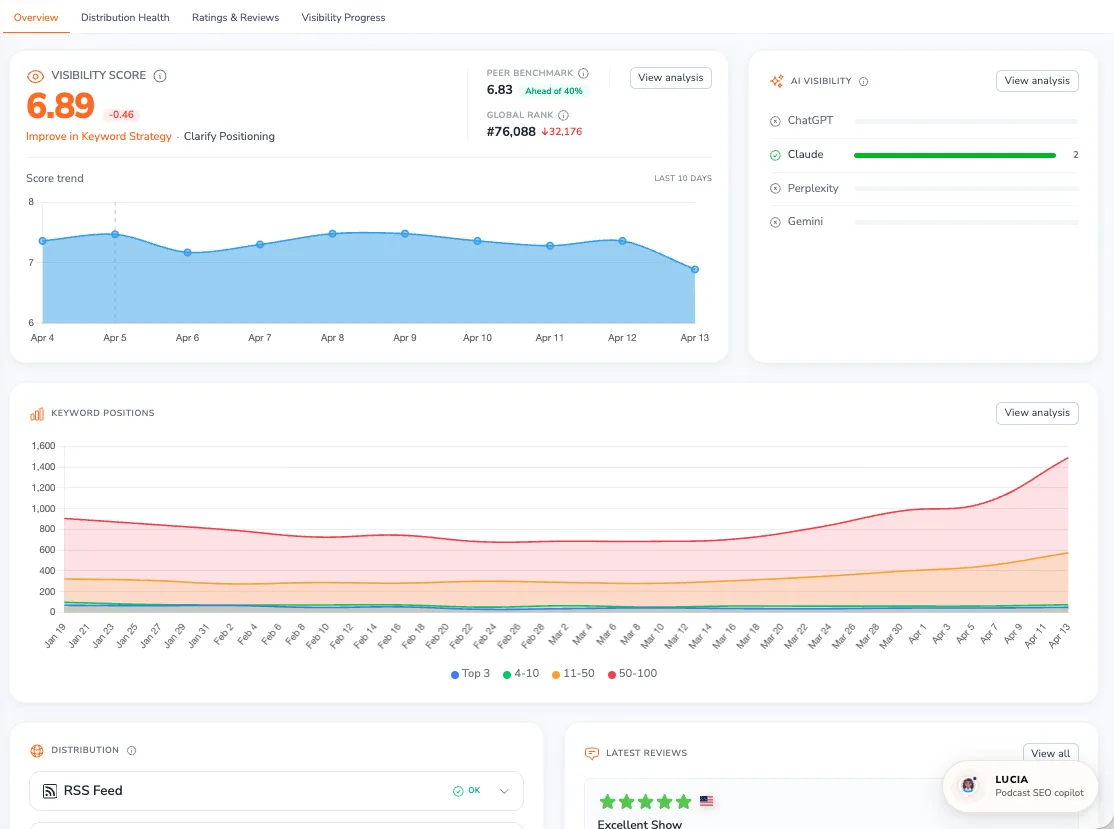
To access: Click Traction in the sidebar — the Overview tab is shown by default.
Visibility Score
The most prominent widget is your Visibility Score — a number on a 0-10 scale that measures how discoverable your podcast is across Apple Podcasts, Spotify, Amazon Music, and YouTube Music. Higher scores mean your show is easier to find.
It isn't a single measurement. The score combines three things: your chart rankings on those platforms, your editorial features (curated collections and featured sections that platforms promote), and your search score (how many keywords you rank for and how high). Chart and editorial changes tend to move the score the most; search shifts move it more gradually. Because it blends all three, a change in your score can come from any of them — not just your keyword rankings.
Alongside the score you'll see:
- Score change — how much your score moved over the last 10 days (for example, +0.12 or -0.05)
- Peer benchmark — the average visibility of comparable podcasts, plus how far ahead of your peers you are. If there isn't enough positioning data to build a reliable peer group, you'll see Needs more data instead; adding clearer Subject or Audience topics in Positioning helps. While the comparison is being refreshed you'll see Updating — your score itself is still current.
- Rank — where you stand among all indexed podcasts (a lower rank number means better discoverability). An arrow next to your rank shows how many positions you've climbed (up) or dropped (down). New shows see Pending until a rank is available.
A score trend chart tracks your visibility over time so you can see the impact of your optimization efforts at a glance. When a notable change occurs, a short explanation appears describing what moved your score.
A note on movement: your score is measured partly in relation to other podcasts, so it can move even on days you change nothing. If a competitor climbs a chart, gains an editorial feature, or starts ranking for keywords you share, that can nudge your score and rank — the same way your own gains affect theirs. So treat a dip or bump as a prompt to look at what changed across your space, not only at what you did.
Click View analysis to open Visibility Progress, which breaks down exactly how each factor contributes to your score. For a deeper explanation of how the score works, see Visibility Score Explained.
AI Visibility
When AI recommendation data is available, the AI Visibility widget shows how often ChatGPT, Claude, Perplexity, and Gemini recommend your podcast when listeners ask about your topics. Each assistant has its own row showing whether it currently mentions your show and for how many topics.
Click View analysis to open the full breakdown in AI Mentions.
Keyword Positions
The Keyword Positions widget tracks how many of your keywords sit in each ranking bucket over time, so you can watch your search footprint grow. Your tracked keywords are grouped into four position bands:
- Top 3 — your strongest, most visible rankings
- 4-10 — keywords ranking on the first page of results
- 11-50 — keywords with room to climb
- 50-100 — keywords on the edge of visibility
Seeing more keywords move into the Top 3 and 4-10 bands over time is a strong sign your optimization efforts are working. Click View analysis to explore your full keyword rankings in Show Visibility.
Distribution
The Distribution widget shows where your show is listed and whether each listing is healthy. It covers your RSS feed plus your presence on Apple Podcasts, Spotify, Amazon Music, and YouTube Music, with a status indicator for each so you can spot problems at a glance.
If PodSEO doesn't detect a dedicated website for your show, this widget also flags it, since a custom website gives your podcast its own Google-indexed pages that platforms alone can't provide.
For a full diagnostic — feed analysis, platform listings, website setup, and feed performance — open the Distribution tab.
Reviews, Featured Placements, Top Charts, and Ratings
The lower section of the grid loads a set of summary panels that give you a quick read on listener sentiment and external visibility:
- Reviews — your most recent listener reviews
- Featured placements — a summary of your editorial visibility across platforms
- Top charts — your current chart presence
- Ratings — your star ratings on Apple Podcasts and Spotify
Each panel links through to its detailed page so you can dig deeper — your reviews and ratings in Ratings & Reviews, your editorial placements in Editorial Presence, and your chart standings in My Charts.
The Overview tab is designed to be the first place you check each day. Scan the headline numbers to see what's changed, then use the View analysis links to jump straight into whichever area needs your attention.
When your show qualifies, use Share Cards to share its PodSEO visibility achievement with a public profile link or downloadable image.