
Appearance
PR Outreach
Manage Your Podcast Pitch Pipeline
PR Outreach provides a Kanban-style CRM for tracking your podcast promotion efforts. Manage pitch targets, track follow-ups, and move opportunities through your pipeline from initial contact to successful feature.
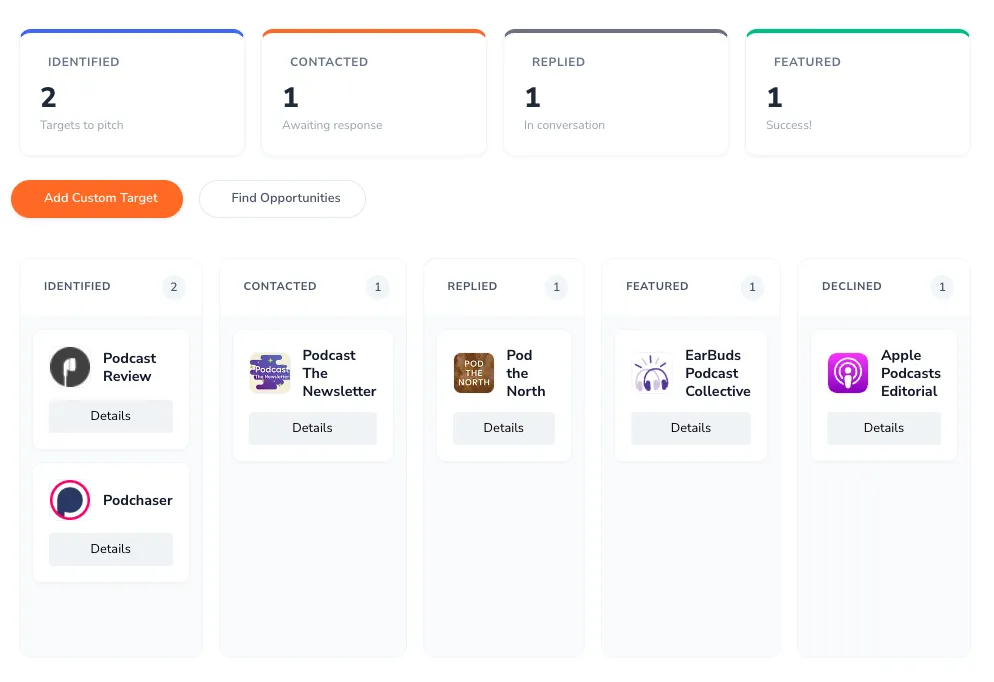
Your Outreach Pipeline
The pipeline organizes your outreach efforts into five stages:
Identified
Targets you've discovered but haven't contacted yet. These are opportunities waiting for your first pitch — editorial contacts, newsletter curators, podcast directories, or media outlets.
Contacted
Pitches you've sent that are awaiting response. When you move a card here, PodSEO records the pitch date automatically.
Replied
Active conversations where you've received a response. These are warm leads that need nurturing toward a feature.
Featured
Success! Targets that have featured your podcast. The feature date is recorded automatically when you move a card here.
Declined
Opportunities that didn't work out. Keeping these helps you track conversion rates and learn from what didn't resonate.
Pipeline Features
Summary Dashboard
At the top, a funnel summarizes your progress across four key stages at a glance:
- Identified - How many targets are ready to pitch
- Contacted - Active outreach awaiting responses
- Replied - Conversations in progress
- Featured - Successful features achieved
The funnel focuses on these four stages. Declined still appears as its own column on the board below, so you can keep a record of opportunities that didn't work out, but it isn't part of the funnel summary.
Overdue Follow-ups
An alert appears when you have follow-ups past their scheduled date. Timely follow-ups are crucial for successful outreach - don't let opportunities go cold.
Target Cards
Each pipeline card shows:
- Target name and domain
- Current status
- Any notes you've added
- Scheduled follow-up date
Drag-and-Drop Management
Move targets between columns as your relationship progresses. Drag a card from "Contacted" to "Replied" when you get a response, or to "Featured" when you achieve success.
Managing Your Targets
Adding Targets
Two ways to add pitch targets:
Add Custom Target - Create your own entry for any newsletter, blog, editor, or award submission you want to pitch. The form asks for:
- Target name (required) - The person or publication
- Website URL
- Description - A brief note on what this target is
- Contact name, Email, and Twitter handle
- Submission page - The URL where you submit your pitch
Once the card is created, open it to add notes about the opportunity.
Find Opportunities - Opens a panel with PodSEO's curated list of pitch targets for editorial, award, and featured placement consideration. This includes platform editorial submission pages (such as Apple Podcasts Editorial and Spotify Editorial) alongside podcast newsletters, directories, blogs, and curated recommendation sites worth pitching — for example, Goodpods, EarBuds Podcast Collective, and All Hear. Click Add on any opportunity to create a card in your Identified column. Each opportunity includes a description and, where available, the submission or contact link you'll need to pitch your podcast.
Target Details
Click any target card to open a detail modal showing:
- Contact information — Name, email, Twitter handle, and submission page URL (where available)
- Notes — Free-text area for tracking your pitch history and conversation details (auto-saves)
- Follow-up reminder — Set a date and PodSEO will alert you when it's due
- Status selector — Change the pipeline stage directly from the modal
- Timeline — When the target was added, when you pitched, and when you were featured
Scheduling Follow-ups
For each target, set a follow-up date. PodSEO will alert you when follow-ups are due so you stay on top of your outreach.
Daily Follow-up Email
On days when you have follow-ups that are overdue or due that day, PodSEO sends you a single daily digest email listing them, split into overdue and due-today items, with a link back to your pipeline. You won't get the email on days with nothing due. The digest respects your email preferences, so if you've opted out of PodSEO emails you won't receive it.
Outreach Best Practices
Building Your Pipeline
- Start with research - Identify publications, newsletters, and platforms that feature podcasts like yours
- Quality over quantity - Focus on relevant targets rather than mass outreach
- Mix target types - Include editorial contacts, newsletter curators, and industry publications
Effective Pitching
- Personalize each pitch - Reference specific content or explain why you're a good fit
- Be concise - Busy editors appreciate brief, clear pitches
- Include value - Explain what's in it for their audience
- Make it easy - Provide assets, links, and everything they need
Following Up
- Schedule systematically - Set follow-up dates for every contact
- Be persistent but respectful - 2-3 follow-ups is appropriate
- Add value each time - Share news, new episodes, or relevant angles
- Know when to move on - Not every pitch will convert
Learning from Success
Track what works in your Featured column:
- Which pitch angles resonated
- What types of targets converted
- Timing patterns that worked
- Content that attracted features
Integration with My Placements
PR Outreach helps you actively pursue features, while My Placements tracks where features appear. Together they give you a complete picture of your editorial visibility efforts and results.
Why PR Outreach Also Boosts Your AI Visibility
Landing your podcast on websites — newsletters, review sites, and "best [topic] podcasts" listicles — does more than reach human readers. AI assistants like ChatGPT, Claude, Perplexity, and Gemini build their podcast recommendations largely from what they read on the open web, and they tend to weigh these website recommendations more heavily than signals from the listening platforms themselves. Every roundup or article that names your show becomes a source an assistant can draw on when a listener asks for recommendations. That makes a disciplined PR Outreach pipeline one of the most effective ways to improve your AI Mentions visibility, not just your traditional media coverage.
Availability
PR Outreach is available on paid plans (Podcaster, Producer, Agency, and Enterprise). The pipeline helps you systematically grow your podcast's media presence.
Related Features: Check My Placements to see where your podcast has been featured, use Curated Lists to research editorial opportunities, and track the payoff in AI Mentions as web recommendations feed AI discovery.