
Appearance
Episode Rankings
Track Which Episodes Rank for Your Keywords
Episode Rankings shows how your tracked keywords perform at the episode level. See which of your episodes rank for each keyword on Apple Podcasts and Spotify, giving you insight into content-level performance.
Episode-level rankings are more volatile than show-level rankings, as platforms frequently refresh their search results.
What You'll See
Keyword Cards
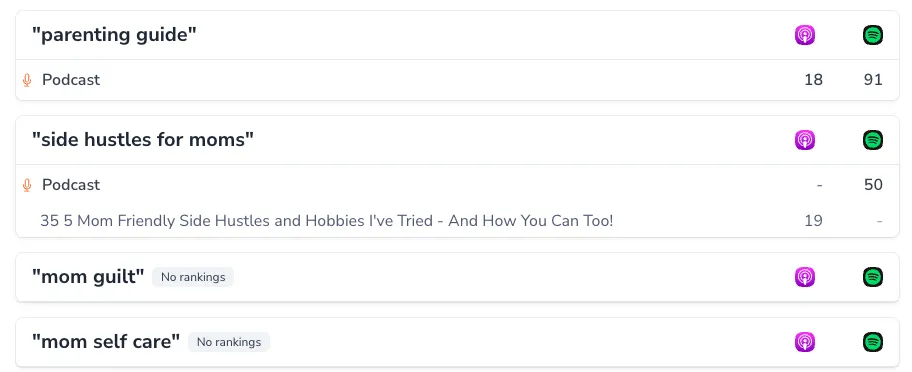
Each tracked keyword gets its own card showing:
- Keyword heading - The search term being tracked
- Ranking status - Whether any episodes rank for this keyword
- Episode list - Episodes that appear in search results for this term
Episode Details
For each ranking episode, you'll see:
- Episode title - Which episode is ranking
- Apple Podcasts rank - Position on AP (if ranking)
- Spotify rank - Position on SP (if ranking; a dash means the episode isn't ranking there)
Each keyword card lists up to 5 ranking episodes. If more episodes rank for the keyword, a "+N more episodes" line shows how many additional episodes are ranking.
Empty States
Keywords without episode rankings show a badge indicating no current rankings. This doesn't mean the keyword is bad - episode rankings are volatile and may appear over time.
Understanding Episode Rankings
How They Differ from Show Rankings
| Aspect | Show Rankings | Episode Rankings |
|---|---|---|
| What ranks | Your podcast overall | Individual episodes |
| Stability | More stable | More volatile |
| View structure | Keywords → platforms | Keywords → episodes |
| Primary use | SEO strategy | Content insights |
Why Episode Rankings Change Frequently
Platforms update episode-level search results often based on:
- Fresh content relevance
- Episode engagement metrics
- Search algorithm updates
- User behavior signals
Expect fluctuation - focus on patterns rather than daily positions.
Episode Rankings reflects a recent 15-day window of search results, so the rankings you see represent current, up-to-date positions.
Using Episode Rankings Strategically
Identifying Content Hits
Find episodes that drive keyword visibility:
- Episodes ranking for high-value keywords
- Content that ranks across multiple keywords
- Episodes with stable, consistent rankings
Content Optimization Insights
Learn what makes episodes rank:
- Title patterns - Do certain formats rank better?
- Topic depth - Does comprehensive coverage help?
- Recency - Are newer episodes ranking more?
Keyword-Content Alignment
See if your content matches your keyword strategy:
- Are target keywords driving episode rankings?
- Which episodes rank for unexpected keywords?
- Are there keywords with no episode representation?
If No Keywords Are Tracked
Episode Rankings shows your tracked keywords from Show Rankings. If you haven't added keywords yet:
- Go to Show Rankings or Keyword Strategy
- Add keywords you want to track
- Return to Episode Rankings to see episode-level data
Integration with Other Features
- Show Rankings - Track these same keywords at the show level
- Episode Visibility - Different view: episodes with their keyword counts
- Keyword Strategy - Keywords from your strategy feed into tracking
Availability
Episode Rankings is available on paid plans.
Related Features: Use Show Rankings for show-level keyword tracking, and Episode Visibility for an episode-centric view of organic rankings.