
Appearance
Episode Visibility
See Which Episodes Drive Your Organic Search Rankings
Episode Visibility shows how individual episodes contribute to your podcast's search visibility. See which episodes rank for keywords on Apple Podcasts and Spotify, helping you understand which content drives discovery.
In the app, this is the episode view of the Organic Visibility tab. Open Organic Visibility in the Search Visibility navigation and switch to episode mode to reach this view; the show-level view of the same tab is covered in Show Visibility.
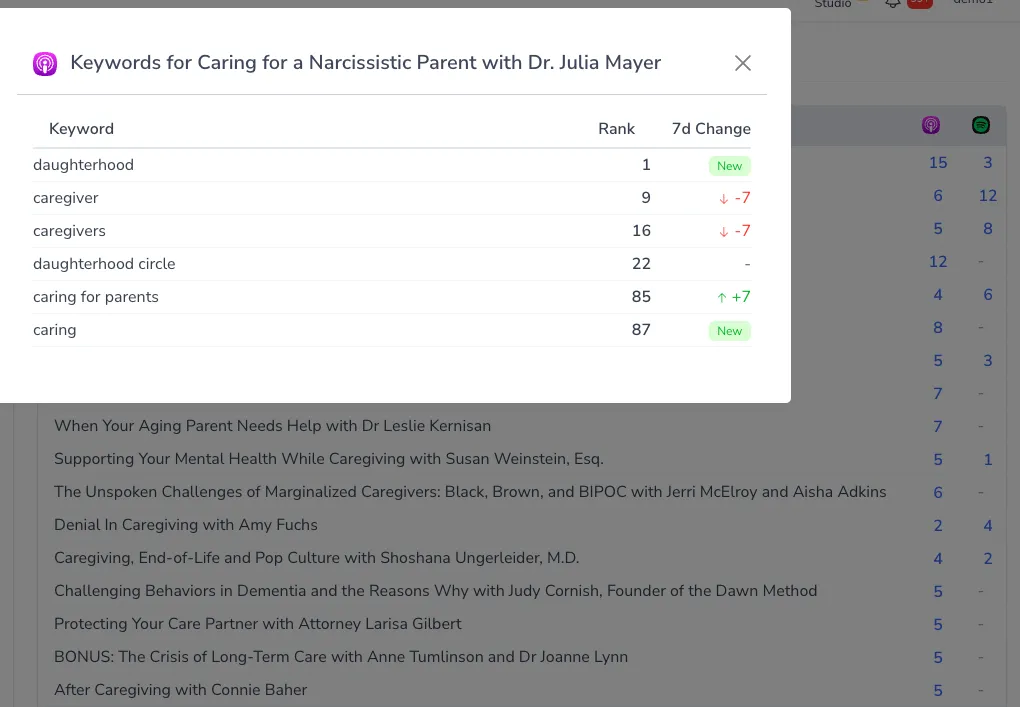
What You'll See
Summary Stats
At the top of the view, a quick summary gives you the big picture at a glance:
- Ranked episodes - How many of your episodes have keyword visibility
- Apple Podcasts - The number of episode keyword appearances on Apple Podcasts
- Spotify - The number of episode keyword appearances on Spotify
- Most ranked - The single episode with the most keyword appearances, and how many it has
Episode Ranking Counts
The main table lists your episodes with ranking counts for each platform:
- Episode title - The episode being tracked
- Apple Podcasts count - Number of keywords this episode ranks for on Apple
- Spotify count - Number of keywords this episode ranks for on Spotify
Sorting Your Episodes
Reorder the list to surface what matters most. You can sort by:
- Latest - Most recently published episodes first (the default)
- Apple Podcasts - Episodes with the most Apple appearances first
- Spotify - Episodes with the most Spotify appearances first
- Total - Episodes with the most total appearances first
Click a column header in the table to sort by it.
Loading More Episodes
The list loads 25 episodes at a time. If you have a larger back catalog, use the "load more" option at the bottom of the list to bring in the next 25 episodes, continuing until your full catalog is displayed.
Keyword Details
Click on any ranking count to see which specific keywords that episode ranks for. This reveals:
- The keyword terms the episode appears for
- Ranking positions on each platform
- How episode rankings differ from show-level rankings
Understanding Episode Rankings
How Episodes Rank Separately
Podcast platforms sometimes rank individual episodes for search queries, especially when:
- The episode title closely matches the search term
- The episode covers a specific topic the show doesn't focus on overall
- The episode has strong engagement metrics
Volatility Note
Unlike show-level rankings which tend to be more stable, episode rankings can change frequently as platforms:
- Refresh their search indexes
- Adjust ranking algorithms
- Respond to engagement signals
Check Episode Visibility periodically rather than expecting day-to-day consistency.
Using Episode Visibility Strategically
Identifying Your Discovery Engines
Find episodes that punch above their weight:
- High ranking counts - Episodes appearing for many keywords are discovery engines
- Unique keywords - Episodes ranking for keywords your show doesn't rank for overall
- Strong performers - Episodes driving visibility in your key topics
Content Strategy Insights
Learn what content drives rankings:
- Title patterns - Do certain title formats rank better?
- Topic coverage - Which subjects generate the most episode-level rankings?
- Episode structure - Are longer or shorter episodes ranking differently?
Optimization Opportunities
Use insights to improve future episodes:
- Replicate success - Create more content similar to high-ranking episodes
- Fill gaps - Cover topics where only individual episodes rank
- Improve titles - Apply learnings from ranking episode titles to new content
Difference from Show Rankings
| Feature | Show Visibility | Episode Visibility |
|---|---|---|
| What it shows | Show-level keyword rankings | Episode-level keyword rankings |
| Stability | More stable over time | More volatile, changes frequently |
| View | Keywords with show rankings | Episodes with ranking counts |
| Use case | Overall SEO strategy | Content-level insights |
Integration with Other Features
- Show Visibility - See show-level rankings that complement episode data
- Show Rankings - Track specific keywords you're monitoring at the show level
- Episode Rankings - See your tracked keywords with episode-level ranking data
Availability
Episode Visibility is available on paid plans.
Related Features: Use Show Visibility for show-level organic rankings, and Episode Rankings to see how your tracked keywords perform at the episode level.