
Appearance
Ratings & Reviews
Track Listener Feedback Across Platforms
Ratings & Reviews gives you a comprehensive view of how listeners rate and review your podcast on Apple Podcasts and Spotify. Monitor your ratings across regions, understand rating distributions, and read individual reviews to learn what resonates with your audience.
What You'll See
Listener Sentiment
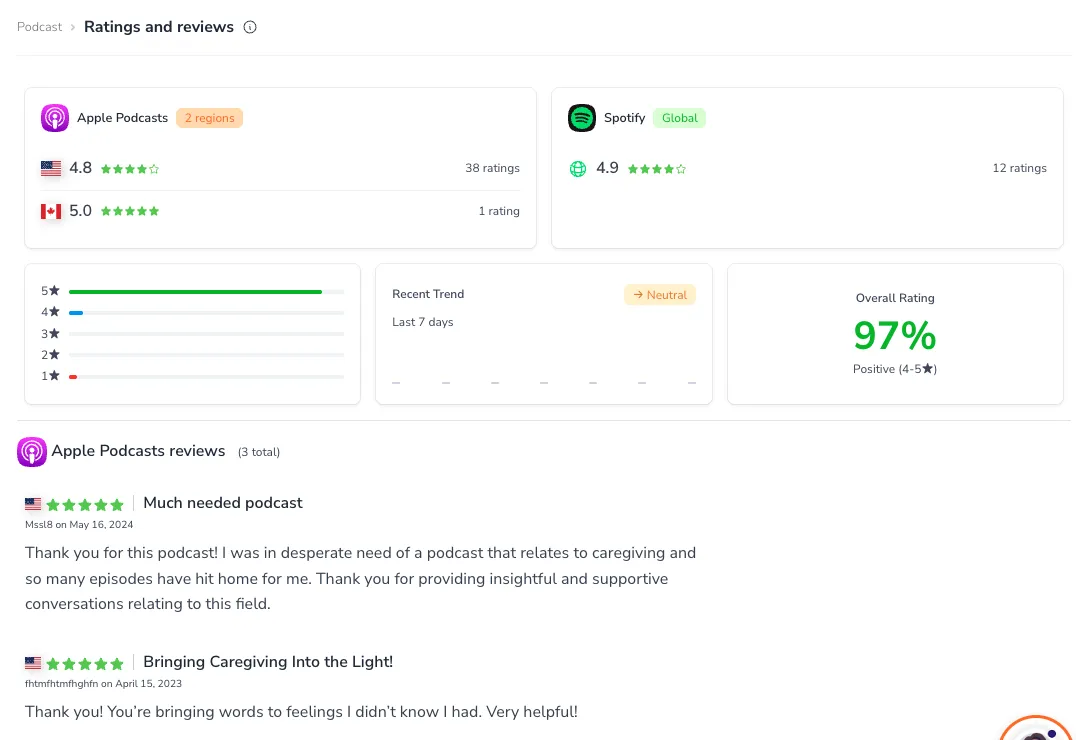
The page leads with Listener Sentiment — a single percentage showing what share of your Apple Podcasts ratings are positive (4 or 5 stars). This is the fastest read on how your audience feels about your show. Below the headline number, a sentiment strip and star legend break the percentage down across all five star levels, so you can see at a glance whether your ratings cluster at the top or spread out.
Next to your sentiment score you'll find quick totals — your total number of Apple ratings, how many storefronts (countries) you appear in, and your Spotify average when available.
Ratings by Storefront
Apple Podcasts reports ratings separately for each storefront (country), and PodSEO lists them in a per-storefront table with a flag, average star rating, and rating count for each. The table shows your first seven storefronts by default; if you appear in more, use the Show more storefronts link to reveal the rest.
Spotify reports a single combined rating, shown alongside as an average star score with its total number of ratings.
Rating Distribution
The Rating Distribution card breaks your Apple ratings down across the star spectrum. Each star level from 5★ to 1★ has its own bar, sized by that level's share of your ratings, with the number of ratings at that level shown alongside. It's a quick way to see whether your ratings cluster at the top or spread out, and your combined 4- and 5-star share appears as the Listener Sentiment percentage at the top of the page.
Last 7 Days
The Last 7 days card tracks how your reviews are trending this week. It shows one bar per day — taller bars mean more reviews that day, and the color reflects that day's average star rating, from strong to low. Hover over a bar to see the date, the number of reviews, and their average rating. A badge in the corner sums up the week as Positive, Negative, or Neutral.
Latest Review
A Latest Review highlight card spotlights your most recent piece of listener feedback, showing its star rating, the storefront it came from, the date, the review title, and a preview of the text. It's a quick way to see what someone just said about your show without scrolling through the full list.
Individual Reviews
Below the highlight, the Apple Reviews list shows your recent reviews, most recent first. Each review card includes:
- Star rating - The rating the listener gave
- Storefront and date - Where the review came from and when it was posted
- Review title and content - The full text of the review
- Author - The listener's display name
Longer reviews are trimmed to keep the list scannable. When a review runs long, click Read full review to expand it in place (and Show less to collapse it again). The list starts with your twelve most recent reviews; if you have more, the Load more button reveals additional reviews twelve at a time so you can work through your full recent history at your own pace.
Understanding Your Ratings
What Ratings Tell You
Your ratings provide valuable feedback signals:
- Overall satisfaction - High average ratings indicate listener satisfaction
- Consistency - Tight distribution around 4-5 stars shows consistent quality
- Problem areas - Clusters of low ratings may indicate specific issues to address
- Regional differences - Varying ratings by country can reveal market-specific preferences
Reading Review Patterns
Look for patterns in your reviews to understand:
- What listeners love - Common themes in positive reviews
- Pain points - Recurring complaints in negative reviews
- Content preferences - Which episodes or topics generate the most feedback
- Listener expectations - What your audience expects from your podcast
Using Ratings Strategically
Improving Your Ratings
Focus on areas that drive positive ratings:
- Consistent quality - Maintain production standards across all episodes
- Listener engagement - Respond to feedback and incorporate suggestions
- Clear expectations - Ensure your podcast delivers what it promises
- Regular publishing - Consistent release schedules build listener trust
Responding to Feedback
Use review insights to improve your podcast:
- Address common complaints - If multiple reviews mention the same issue, prioritize fixing it
- Double down on strengths - Emphasize what listeners praise in future content
- Engage your community - Thank listeners for positive reviews and acknowledge feedback
- Track changes - Monitor if improvements lead to better ratings over time
Regional Considerations
Apple Podcasts provides ratings by storefront (country), allowing you to:
- Identify strong markets - See where your podcast resonates most
- Spot opportunities - Find regions where ratings could improve
- Tailor content - Consider regional preferences for certain topics or styles
- Expand strategically - Focus growth efforts on markets with positive reception
Integration with Other Features
Ratings & Reviews connects with your broader podcast strategy:
- Command Center - Tasks may suggest improvements based on rating patterns
- Planner - Low ratings in certain areas may indicate content optimization opportunities
- Competitor Analysis - Correlate rating changes with specific episodes or events
Availability
Ratings & Reviews is available to all users. Rating data updates regularly as platforms report new ratings and reviews.
Related Features: Check the Overview tab for your overall podcast metrics, and use Command Center to find actionable improvements that can boost listener satisfaction.