
Appearance
Command Center
Your Podcast's Home Base
The Command Center is your starting point in PodSEO. It brings together the most important signals about your podcast's health, surfaces what needs attention, and tells you what to do next — all in one view.
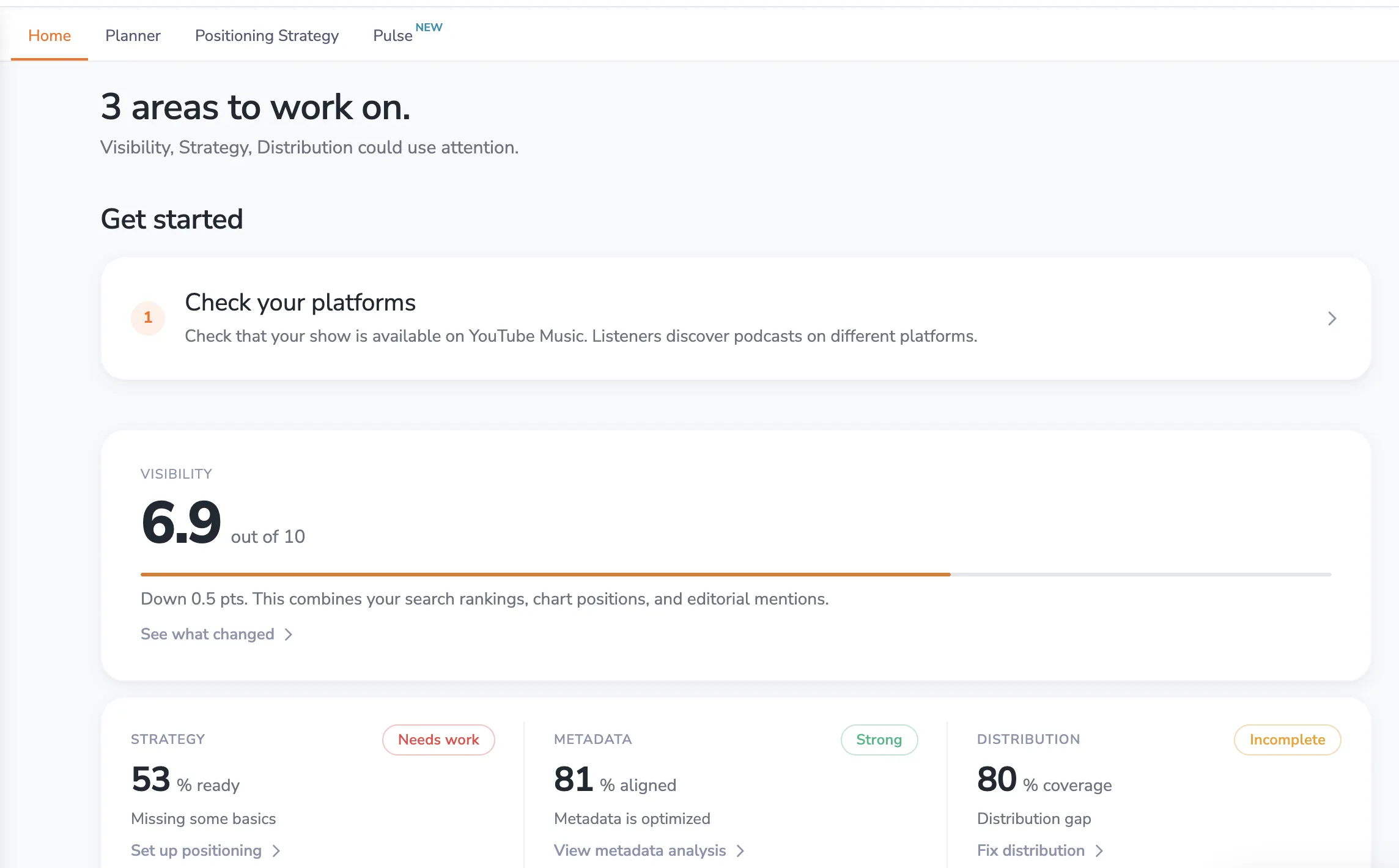
To access: Click Command Center in the sidebar. The Command Center has four tabs across the top: Home · Planner · Positioning Strategy · Pulse. This article covers Home.
What You'll See
Status Line
At the top, a daily status message summarizes where things stand. If areas need attention, they're called out directly. This status adapts based on how recently you've visited — if you've been away, it highlights what changed while you were gone.
Optimization Score
The main card tells you how well set up your show is: "Your show is X% optimized", with an Optimization score gauge. The score reflects the inputs you control — your setup, positioning, distribution, and episode metadata. Below it, four tiles break the score down:
- Optimization — Overall progress on setup, positioning, and distribution checks, with a link to your next recommended step
- Positioning — How complete your Positioning Strategy is
- Distribution — How many of the core listening platforms your show is available on
- Episode metadata — How complete your episode titles, descriptions, and other metadata are
Each tile is color-coded (green, amber, or red) and links to the page where you can improve it.
Your optimization score measures what you've put in place; it isn't the same as your visibility. Visibility is tracked separately as an outcome (see below).
Foundation (New Users)
When you first add a podcast, the Foundation section shows three setup steps and your progress (for example, "1/3 complete"):
- Choose keywords — Set your primary keywords so you can track how your podcast ranks in search. If PodSEO picked keywords for you, the step asks you to Review keywords to confirm they match your strategy.
- Add competitors — Add podcasts chasing the same listeners so you can see how you compare. If PodSEO picked competitors for you, you'll be asked to Review competitors.
- Check platforms — Make sure your show is available across the platforms where listeners discover podcasts.
Each completed step earns you 10 credits you can use for Social Publishing. The Foundation section stays visible until you've finished all three steps, and remains on your home page for your first couple of weeks so you can see your progress.
Get Your Show Seen
This section pairs your visibility with social promotion:
- Visibility outcome — Shows where your podcast stands compared with other shows (for example, "Top 12%") and whether it moved up or down over the last 10 days. Click Open visibility progress to see the full breakdown in Visibility Progress.
- Social — A card that adapts to where you are with Social Publishing. If you haven't connected an account yet, you'll see Connect a channel. If you're connected but haven't made clips, you'll see Create clips. If clips are ready and waiting, you'll see a preview of them and a Post a clip button. Once you're posting regularly, it shows how many posts you've published. If one of your social accounts needs to be reconnected, a warning appears above the card so you can fix it before scheduled posts are affected.
What's Changing (Insights)
The insights section surfaces notable movements and opportunities in your tracked market. If you've been away for a while, this section is titled While you were away so you can catch up on what changed.
- Competitor weakness — When a competitor loses a ranking, creating an opportunity for you to move up
- Rank breakthrough — When you're close to breaking into the top 10 for a keyword
- Falling keyword — When one of your rankings is slipping and needs attention
- Stale metadata — When your podcast information hasn't been updated in a while
Each insight links directly to where you can take action.
What to Do Next (Tasks)
A prioritized list of actions based on your podcast's current state and your optimization cadence. Tasks are generated from across PodSEO — keyword strategy reviews, metadata updates, competitor checks, and more. After time away, this section is titled Catch up.
If you use YouTube Insights, YouTube tasks appear here too: an Activate YouTube Insights reminder when your channel is connected but Insights isn't active yet, and up to two open title suggestions (for example, adding a keyword to an episode's YouTube title). Clicking a title suggestion opens that episode directly on the YouTube page.
Priority tasks are highlighted, and overdue items show how many days have passed since they were due. Each task links to the relevant feature so you can act immediately. When nothing needs attention, you'll see You're caught up — PodSEO will surface new tasks as your data updates.
Other Command Center Tabs
Alongside Home, the Command Center tabs give you access to three important features:
- Planner — Plan episodes, check metadata alignment, and get AI-powered content suggestions
- Positioning Strategy — Define your podcast's long-term strategic positioning
- Pulse — Discover trending topics relevant to your podcast's niche
Strategic Use
Daily Check-In
Make the Command Center your first stop when you open PodSEO. The status line and optimization score tell you immediately whether anything needs attention, saving you from checking each section individually.
Weekly Review
Use the insights and tasks sections for your weekly optimization review. The Command Center aggregates signals from across PodSEO so you can prioritize your time effectively.
After Changes
After updating metadata, publishing episodes, or changing your keyword strategy, check back to see how your score and insights respond. The Command Center reflects changes as PodSEO processes new data.
Integration with Other Features
The Command Center connects to every part of PodSEO:
- Optimization tiles link to Positioning Strategy, Distribution Health, and your episode metadata; the visibility outcome links to Visibility Progress
- The social card links to Social Publishing
- YouTube tasks link to YouTube Insights
- Tasks guide you to Planner, Competitive Analysis, and other features
- Insights connect to Show Rankings and Keyword Tracker for deeper analysis
Pro Tips
- Start every PodSEO session at the Command Center to quickly assess what needs your attention
- Don't ignore amber or red tiles — they point to inputs that are holding your podcast's discoverability back
- Finish the three Foundation steps early — they give PodSEO better data to work with and earn you credits for social clips
- Use the task list to stay on a regular optimization cadence rather than making changes sporadically
- The insights section is especially valuable after time away — it catches you up on what changed
The Command Center transforms podcast optimization from a scattered process into a focused, prioritized workflow. Let it guide your efforts toward the actions that matter most.
For a podcast that has not launched, your home is Design and Pre-launch Planning (ready soon). Agency teams can also review multiple client shows in the Agency workspace.