
Appearance
Pulse
Discover Trending Topics for Your Podcast
Pulse surfaces news, trending searches, and spikes in public interest that are relevant to your podcast's niche. Instead of manually scanning news feeds and search trends, Pulse brings the most relevant conversations directly to you — with context about why they matter for your show.
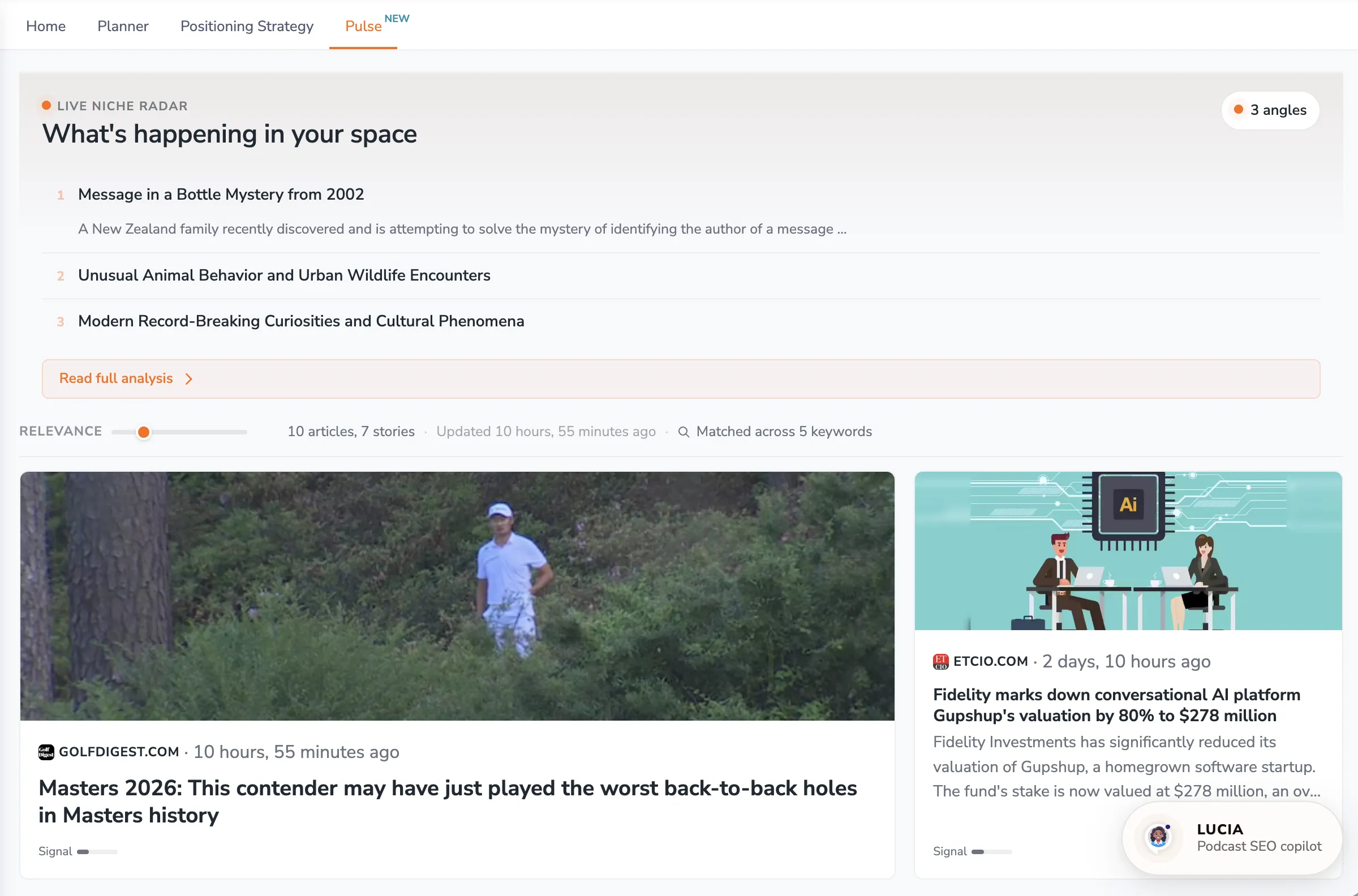
To access: Click Command Center in the sidebar, then open the Pulse tab.
What Pulse Tracks
Pulse monitors multiple signals to identify trends relevant to your podcast:
- News coverage — Articles and stories related to your podcast's topics and keywords
- Trending searches — Google Trends search terms that are trending right now and match your tracked keywords
- Wikipedia spikes — Sudden increases in public interest for specific topics, often indicating breaking events or viral moments
How Trends Are Matched to Your Podcast
Pulse doesn't show generic trending topics. It uses your podcast's profile — including your positioning, keywords, category, and recent episode topics — to filter and rank what it finds by relevance to your specific show.
What You'll See on the Page
Live Niche Radar
At the top, the Live niche radar ("What's happening in your space") presents a set of numbered Angles — ready-made story ideas drawn from what's happening in your niche. Each angle includes a Why this matters explanation connecting it to your show and audience, plus links to the sources behind it so you can read further.
News Matches
Below the radar, news articles matched to your topics appear as cards. Each card shows the source, how recently it was published, and a Signal strength indicator. When several outlets cover the same story, the card shows how many sources are reporting it — a sign the story is gaining momentum.
Use the Relevance slider to control how closely articles must match your podcast. Slide toward higher relevance to see only the tightest matches, or lower it to explore a broader set of stories.
Trending Keywords
The Trending keywords panel lists Google search terms trending right now that match your tracked keywords, along with recent search volume. If your podcast already ranks for one of these terms, it's marked You rank for this — a strong cue that a timely episode could capitalize on the surge.
Recent Wikipedia Spikes
The Recent Wikipedia spikes panel highlights Wikipedia articles related to your niche whose daily views have suddenly jumped. These often signal breaking news or a wave of public curiosity about a topic.
Using Pulse Strategically
Timely Content Planning
Check Pulse before your planning sessions to identify topics your audience is actively interested in. Timely episodes that tap into current conversations tend to attract new listeners through search.
Competitive Advantage
Being among the first podcasters in your niche to cover a trending topic can boost your visibility. Pulse helps you spot opportunities before they become widely covered.
Content Pipeline
When you find a relevant trend, open the Planner and add it as an episode idea on your Board, using the angle and sources from Pulse in your notes.
Integration with Other Features
- Planner — Add the trends you want to cover as ideas on your Board
- AI Producer — Pulse insights complement the AI Producer's content gap and keyword opportunity analysis
- Positioning Strategy — Your positioning helps Pulse identify the most relevant trends for your show
Availability
Pulse is available to users on paid plans. Trend data updates regularly throughout the day.
Pro Tips
- Check Pulse at least weekly to stay aware of trends in your niche
- Not every trend deserves an episode — focus on trends that align with your positioning and keyword strategy
- Timely content works best when published quickly, so prioritize stories with a strong signal and many sources, and trending keywords you already rank for
- Use trends as inspiration even if you don't cover them directly — they reveal what your audience is currently thinking about
Pulse helps you stay ahead of the conversation in your niche, turning real-world events and trending searches into content opportunities that attract new listeners.