
AI Mentions
Track Your Podcast's Visibility Across AI Platforms
AI Mentions shows how often major AI platforms recommend your podcast when users ask for suggestions. As more listeners turn to ChatGPT, Claude, Perplexity, and Gemini for podcast recommendations, understanding your visibility across these platforms becomes essential for growth.
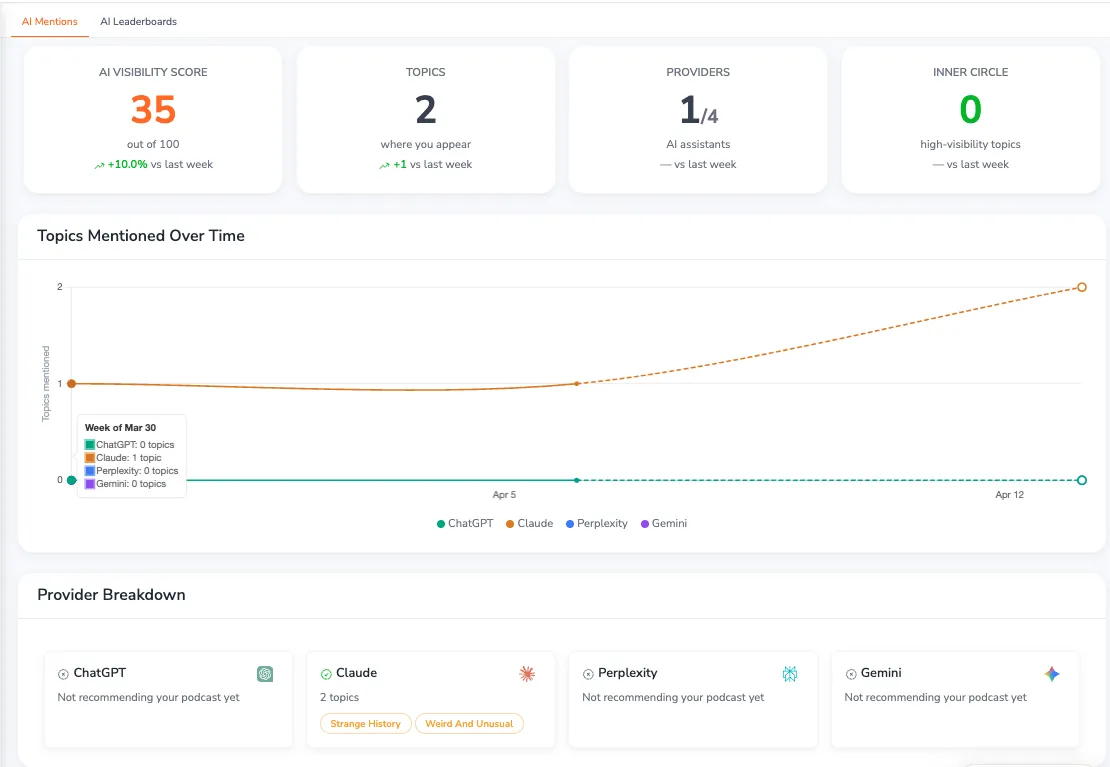
To access: Click Get found → AI Visibility in the sidebar, then open the AI Mentions tab.
Why AI Visibility Matters
The way people discover podcasts is changing. Beyond traditional search and browse, listeners increasingly ask AI assistants questions like "What are the best business podcasts?" or "Recommend podcasts about true crime." When AI recommends your podcast, you gain access to an entirely new discovery channel.
PodSEO tracks recommendations from four major AI platforms:
- ChatGPT (OpenAI)
- Claude (Anthropic)
- Perplexity
- Gemini (Google)
Each platform uses different data sources and recommendation algorithms, so your visibility can vary significantly across them.
What PodSEO Monitors
To measure this, PodSEO monitors 900+ topics — the kinds of things listeners actually ask about, spanning genres, audiences, listening contexts, intents, and formats (for example, "best business podcasts," "podcasts for a long commute," or "shows to help me fall asleep"). For each topic, PodSEO asks all four AI assistants which podcasts they recommend, then records where your show appears. This is how your dashboard reflects real recommendation behavior across the AI landscape rather than a single spot check.
Understanding Your AI Visibility Dashboard
Preparing Your Results
When you first open AI Mentions for a podcast, you may see Preparing your AI visibility results while PodSEO checks your topics with the AI assistants. The page updates automatically once results are ready. If your topics haven't been checked yet, the page lets you know that results will appear after they're checked.
The Last 8 Weeks
Your dashboard is built from recent results—the last 8 weeks. The summary numbers, provider breakdown, and chart all reflect mentions recorded in that window, and the chart shows the exact date range it covers. Older results are still shown where they're useful (marked as older), but they don't count toward your recent numbers.
AI Visibility Score
Your AI Visibility Score (0-100) provides a snapshot of how well your podcast performs across AI recommendations, based on the latest mentions recorded within the last 8 weeks. The score considers:
- Topic coverage — How many topics your podcast appears in
- Provider coverage — How many of the four AI platforms mention you
- Consistency — Whether you appear regularly across multiple providers
A higher score indicates stronger overall AI visibility and more opportunities for discovery.
Summary Numbers and Weekly Change
Next to the score, three summary numbers give you the big picture:
- Topics — How many topics have mentions of your podcast
- Providers — How many of the four assistants are mentioning you
- Inner circle — How many topics are mentioned by 2 or more assistants
The score and each number show a vs last week change, so you can quickly see whether your AI visibility is growing, shrinking, or flat.
Topics Mentioned Over Time
The Topics mentioned over time chart tracks how many of your topics received mentions across recent periods. Hover over or tap a point on the chart to open the list of topics mentioned in that period. (Keyboard users can focus the chart, use the Left/Right arrow keys to choose a period, and press Enter to view its topics.)
Previously Mentioned
The Previously mentioned section lists topics where assistants mentioned your podcast recently but not in their latest results. Each entry shows the topic, when your podcast was Last seen there, and which assistants previously mentioned you. Use this list to spot topics you're at risk of losing.
Provider breakdown
See exactly which AI platforms recommend your podcast and for which topics. Each provider card (ChatGPT, Claude, Perplexity, Gemini) shows:
- How many topics have recent mentions from that assistant, with the topic names
- How many topics have older results (outside the recent window)
- Last result — the date of that assistant's most recent result
- How many of your topics were checked in the last 8 weeks (for example, "40 of 52 topics checked in the last 8 weeks")
If an assistant was checked but didn't mention you, the card says "No mentions in recent results."
Your topics
Topic cards show your performance for individual topics like "Business Podcasts," "True Crime," or "Podcasts for Entrepreneurs." Each card displays:
- The topic and its type
- An Inner or Outer badge
- Last checked date (or Last mentioned date plus an Older result badge if the topic's latest result is outside the recent window)
- Your frequency percentage
- Your rank among the podcasts mentioned for that topic
Click any topic card to open its details. The top of the window shows Your podcast by assistant: for each assistant, whether it mentioned you, when it was checked, and—where relevant—when it last mentioned you. Below that is the topic's full leaderboard of mentioned podcasts. If the topic's results are older, the window notes that they're older saved results and are not included in your recent score.
Understanding Frequency
On AI Mentions, frequency is the share of the four AI assistants that mention your podcast for a topic. If two of the four assistants mention you, your frequency for that topic is 50%; if all four do, it's 100%. It's always measured against all four assistants, so a topic checked by only one assistant can't look like full coverage.
These are observations from the answers PodSEO collected, not a promise about what any individual listener will be told — assistants change their answers, and a real user's phrasing, location, and conversation history can all shift the result. (The AI Leaderboards tab uses a different, week-by-week frequency measure; see that article for details.)
Inner Circle Topics
Topics where your podcast is mentioned by 2 or more of the 4 assistants are marked as "Inner Circle" topics (you'll see "Inner circle = 2+ assistants" on the page). These represent your strongest areas of AI visibility — topics where more than one assistant independently associates your podcast with the subject. Topics mentioned by only one assistant are marked "Outer."
Building more Inner Circle topics should be a key goal, as it indicates robust visibility that doesn't depend on any single AI platform.
Compare your share of voice and find a page to pitch
Where available, Share of voice compares your show with competitors across your topics. Each cell counts how many of the four assistants recommend that show; it is not a share of listeners or referrals.
In Sources the assistants cite, use Pitch targets to inspect the exact page and the shows it names. Pitch this page saves it to PR Outreach with the status In outreach, as shown below.
These are pages observed in saved assistant answers, not open requests from journalists. Adding a page sends no message and does not guarantee a placement or a future AI recommendation. Use All sites to find its status again after adding it.
Knowledge Check
At the bottom of the page, the Knowledge check card links to Knowledge Check, where you can ask each assistant directly about your podcast and see where its knowledge differs from your own materials.
Note that mentions reflect saved AI responses, not listener referrals.
How to Improve Your AI Visibility
Optimize Your Podcast Metadata
AI systems analyze your podcast title, description, and episode content to understand what topics you cover. Clear, descriptive metadata helps AI accurately categorize and recommend your podcast.
- Use natural language that describes your content clearly
- Include relevant topic keywords in your show description
- Ensure episode titles reflect the actual content
Build Authority in Your Niche
AI recommendations favor podcasts that demonstrate expertise and consistent quality in specific topics. Focus on:
- Publishing regular, high-quality content in your core topics
- Building a track record of episodes that serve your target audience
- Developing clear positioning that AI can recognize
Expand Your Web Presence
Websites, newsletters, and articles can help people discover your show and may also be cited by assistants. Use the sources shown in AI Mentions to explore relevant pages; a placement does not guarantee an AI recommendation.
That makes AI visibility closely tied to your PR Outreach efforts:
- Use PR Outreach to actively pitch your podcast to the newsletters, blogs, directories, and listicle publishers most likely to recommend shows like yours. Relevant placements can introduce your show to new readers and may give assistants another source to find.
- Use My Placements to track the web links and editorial features you've already earned, to review the coverage you have earned.
Monitor your results over time, without assuming that any one placement caused a change.
Monitor and Adapt
Check your AI Visibility dashboard regularly to spot trends:
- New topics where you're gaining visibility
- Providers where your visibility is changing
- Opportunities to strengthen weak areas
Integration with Other Features
AI Mentions works alongside other PodSEO features to give you a complete picture of your podcast's discoverability:
- PR Outreach — Find relevant publications and manage outreach opportunities
- My Placements — Track the web links and editorial features you've earned
- AI Leaderboard — See which podcasts AI recommends most for any topic, not just your own
- Keyword Strategy — Traditional search keywords complement AI visibility
Availability
AI Mentions is available on paid plans. Free users see a limited preview, which may include a real summary of saved results or clearly labelled sample data, depending on availability. The dashboard updates regularly as PodSEO queries AI platforms for the latest recommendations.
Pro Tips
- Treat AI visibility and PR as one effort: use PR Outreach to find relevant listicles and publications; compare changes over time without assuming a placement caused them
- Use AI Leaderboard to research competitors and discover topic opportunities
- Combine AI visibility insights with your Keyword Strategy to optimize for both traditional search and AI discovery
- Focus on building Inner Circle topics — consistent visibility across all providers is more valuable than strong presence on just one
- Clear positioning in your metadata helps AI platforms understand and categorize your podcast accurately