
Appearance
Planner
Plan, Optimize, and Produce Episodes Strategically
The Planner is your episode planning hub. It combines a kanban board for managing episode ideas, a calendar view for scheduling, and an AI-powered producer for discovering new topics — all anchored by a real-time view of how well your podcast metadata aligns with your keyword strategy.
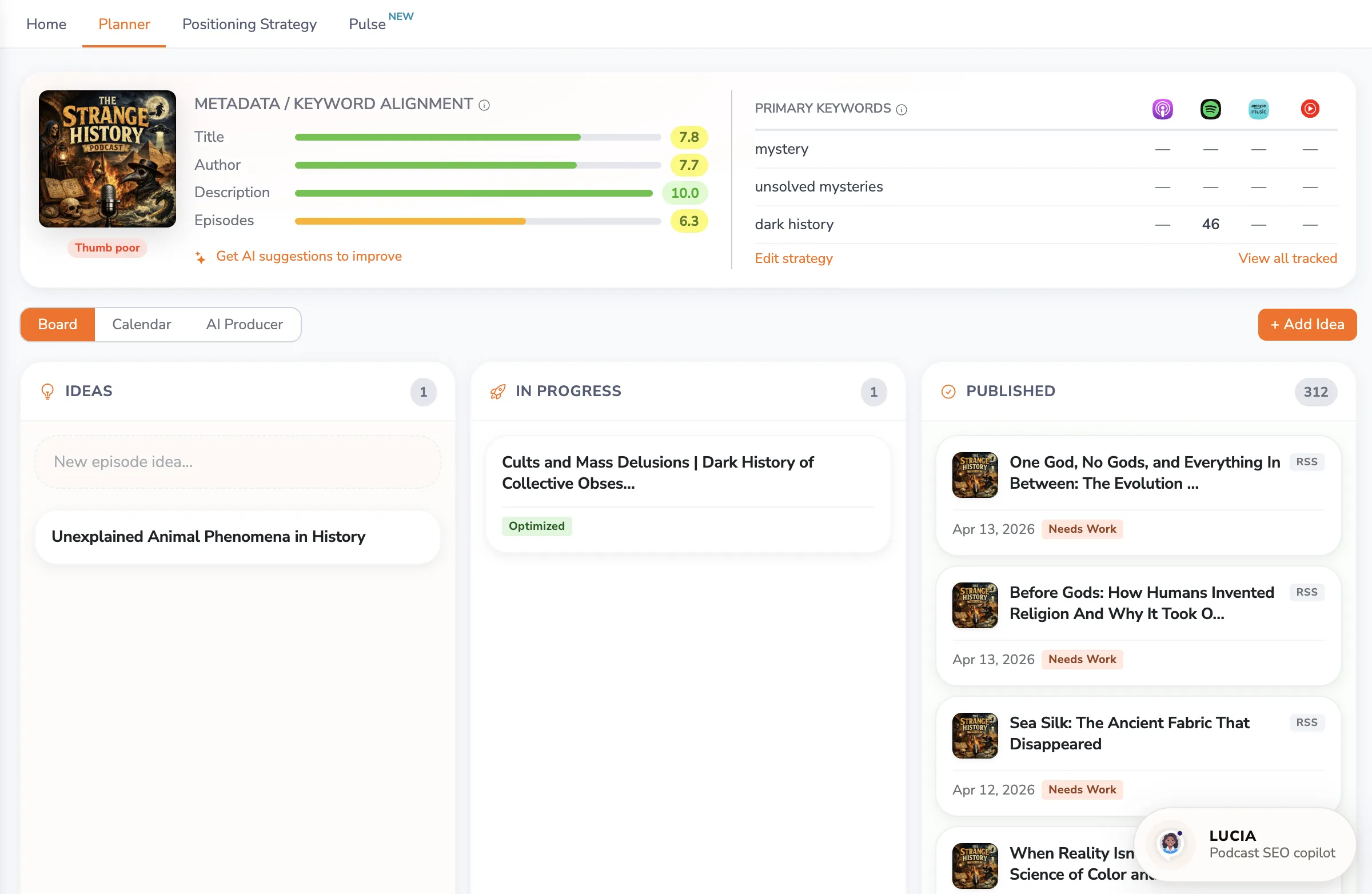
To access: Click Command Center in the sidebar, then open the Planner.
Metadata / Keyword Alignment
At the top of the Planner, the Metadata/Keyword Alignment card shows how well your podcast's metadata matches your current Primary keyword strategy. This is the central place to assess and improve your podcast's SEO fitness.
Alignment Scores
The card displays scores for each metadata component:
- Title — How well your podcast title incorporates your Primary keywords
- Author — Keyword alignment in your author/creator field. Don't skip this one: in PodSEO's ranking observations the Author field appears to have a disproportionate effect on Apple Podcasts search, where a match on the author behaves much like a match on an artist name in music search. Apple doesn't publish weights, so treat it as a pattern worth testing — a descriptive author string (your name plus a short topical qualifier) often moves Apple rankings more than creators expect. See the platform algorithm guide for the full explanation.
- Description — How effectively your description integrates target keywords
- Episodes — How well your planned and published episodes align with your strategy
Each score is shown as a progress bar with a numeric rating, making it easy to spot which areas need improvement.
Get AI Suggestions to Improve
Click "Get AI suggestions to improve" to receive personalized, AI-powered recommendations for optimizing your title, author field, and description. The suggestions are tailored to your specific Primary keywords and provide concrete changes you can implement.
This feature replaces what was previously available as a standalone SEO Analysis page — now integrated directly into your planning workflow.
Primary Keywords Rankings
Next to the alignment scores, a table shows your current search rankings for each Primary keyword across Apple Podcasts, Spotify, Amazon Music, and YouTube Music. This gives you immediate feedback on how your optimization efforts are performing.
If your Primary keywords haven't changed in several weeks, a reminder suggests rotating your strategy to keep your SEO fresh.
Quick links let you Edit strategy (jump to Keyword Strategy) or View all tracked (jump to Keyword Tracker).
Board Tab
The Board provides a kanban-style view for managing your episode pipeline.
Columns
- Ideas — Episode concepts you're considering. Add ideas manually or import them from the AI Producer.
- In Progress — Episodes you're actively working on. When you move a card here, you can ask PodSEO for AI-powered title and description suggestions aligned with your keyword strategy.
- Published — Episodes that have been released. Published episodes can be analyzed individually for keyword alignment — unlike the previous system that only analyzed the last 4 episodes, you can now review any episode on your board.
Working with Cards
- Add ideas using the "+ Add Idea" button
- Move cards between columns as episodes progress through your workflow
- Get AI suggestions for title and description when an episode is in progress
- Link to feed — Connect planned episodes to published feed entries
Reuse and reschedule episodes
Open a card to see the actions available for its current stage:
- Duplicate copies an episode into a new plan you can adapt.
- Plan Follow-up creates the next episode based on the existing schedule; it appears for published episodes and dated episodes in progress.
- Reschedule moves an overdue planned date to today. Edit the date when you need a different day.
- Delete removes an unused idea from the board; Archive hides eligible episodes you no longer want in the active pipeline. These actions do not delete audio from your host.
Published or linked episodes cannot be archived directly. Review the connection and use Unlink first if you need to separate the plan from its feed episode. Unlinking does not remove the published episode from listening platforms.
Connect a plan to its published episode
Open the card, use Link to published episode, and select the matching feed entry. Check the title and release date so you do not attach the plan to the wrong episode. Use Unlink to correct a mistake. Linking connects the planning record with published content; marking a card Published does not upload audio or distribute an episode.
Target keywords for an individual episode
On paid plans, select the tracked keywords relevant to the episode in its editor. This lets you focus an episode on a specific topic while maintaining the broader show strategy. Free plans do not include episode keyword targeting or AI episode suggestions. You can also ask LUCIA to help manage your episode plans.
For client sign-off, see Agency approvals. A required approval covers the submitted version; changing the content can require a new review.
Calendar Tab
The Calendar view shows your episodes on a timeline, helping you visualize your publishing cadence.
- Month view — See all episodes in a traditional calendar grid
- Timeline view — A linear view of episode dates for planning ahead
Use the Calendar to maintain a consistent publishing schedule, which is an important factor in platform algorithms and listener retention.
AI Producer Tab
The AI Producer helps you discover new episode topics and content opportunities.
What It Analyzes
- Trending topics — What's gaining attention in your podcast's niche right now
- Content gaps — Topics your competitors cover that you haven't addressed yet
- Keyword opportunities — Keywords with growth potential based on your strategy and rankings
- Optimal publishing timing — Scheduling guidance that helps you turn your release cadence into a strategic advantage
From Ideas to Board
When the AI Producer suggests a topic, click Create Episode to add it to your Board as a new episode plan, with the suggested angle saved in its notes. This creates a seamless flow from discovery to planning to production.
Social Publishing
The Planner's view switcher also includes a Social Publishing button. Rather than opening inside the Planner, it takes you to the dedicated Social Publishing page, where you can turn your episodes into short video reels — surface an episode's best moments, generate vertical clips, and publish them to connected social destinations — YouTube Shorts, LinkedIn, Bluesky, Instagram, Threads, Facebook, and TikTok (paid plans).
For a full walkthrough, see the Social Publishing article.
The Planning Workflow
The Planner supports a complete episode planning cycle:
- Check alignment — Review your Metadata/Keyword Alignment scores to understand your current SEO position
- Get suggestions — Use "Get AI suggestions to improve" to identify specific metadata improvements
- Discover topics — Use the AI Producer to find relevant new episode ideas
- Plan episodes — Add ideas to the Board and organize your pipeline
- Optimize content — As episodes move to In Progress, get AI-powered title and description recommendations
- Track results — After publishing, monitor how episodes perform in Search Visibility
Integration with Other Features
- Keyword Strategy — Your Primary keywords drive the alignment scores and AI suggestions
- Positioning — Your strategic positioning informs the AI Producer's topic recommendations
- Competitive Analysis — Competitor data feeds into content gap analysis
- Show Rankings and Keyword Tracker — Track the impact of your optimization efforts
Availability
The Board and Calendar are available to all users. On the free plan, the Board can hold up to 3 active planned episodes at a time; paid plans are effectively unlimited. The AI Producer and AI-powered suggestions require a paid plan.
Pro Tips
- Review the Metadata/Keyword Alignment card every time you update your keyword strategy — it updates in real time
- Use the AI Producer regularly to keep your content pipeline full of strategically relevant ideas
- Don't optimize all metadata at once — make changes incrementally so you can track what's driving ranking improvements
- Primary keywords are best for show-level metadata (title, description), while Secondary keywords work well for individual episode optimization
- Plan in batches of 5-10 episodes aligned with your current keyword strategy, then evaluate results before adjusting
The Planner brings together planning, optimization, and content discovery into a single workflow, helping you create episodes that are both valuable to your audience and optimized for discoverability.