
Appearance
Distribution Health
Make Sure Every App and Directory Can Find Your Show
Distribution Health gives you a complete picture of where your podcast is listed and whether each of those listings is healthy. Your RSS feed is the single file every podcast directory reads, so when it works well your episodes show up everywhere they should — and when something goes wrong, it can quietly affect every app at once. This page helps you confirm your feed is sound, see where your show is distributed, and catch problems before they cost you listeners.
To access: Navigate to Traction in the sidebar, then select the Distribution tab.
Your Feed and Where You're Listed
A row of shortcuts at the top of the page jumps straight to each section: Feed, Website, Primary distribution, Grow your reach, App and directory links, and — when available — Share your show and Reach more listeners.
Distribution Health Warning
If something needs attention, a warning banner appears above everything else. It explains the problem in plain terms (for example, a feed issue or a missing platform) and shows an X% health badge. The percentage reflects whether your show is listed on the four major apps — Apple Podcasts, Spotify, Amazon Music, and YouTube Music — and whether your RSS feed responds correctly. Any platform that isn't available for your show is left out of the calculation. When everything is in place, the banner disappears. Use the button in the banner to jump straight to the feed check.
Feed
Your Feed is the RSS file every directory pulls from. PodSEO shows your primary feed along with any alternate or redirected feeds it detects, each with a status indicator so you can tell at a glance whether things look healthy or need attention. Having a single, clean primary feed matters: alternate or duplicate feeds can split your stats and confuse directories about which version to follow.
Under the feed, a freshness panel shows when PodSEO last read your feed and what it currently has on file — Title, Author, Description, Episodes, and Latest episode. If you just changed something at your host and don't see it reflected in PodSEO yet, compare these values with what you published, then click Read it again to ask PodSEO to re-read your feed. The new values appear within a few minutes.
Website
Your Website is your show's home on the web, detected from your RSS feed. A dedicated website is one of the biggest discoverability levers you control, because it's the only place your show gets Google-indexed pages and a custom domain that no platform can lock away. If PodSEO doesn't find a custom website (or your feed only points at a hosting or directory page), it flags that here so you know there's an opportunity to claim that ground.
Primary Distribution
Primary distribution covers the four apps where most podcast listening happens: Apple Podcasts, Spotify, Amazon Music, and YouTube Music. Each platform gets a row with a status indicator:
- Green — PodSEO found one listing for your show
- Amber — PodSEO found more than one active listing. A warning explains that multiple listings usually mean duplicates, which split your rankings and reviews. Contact that platform's support to merge them where possible.
- Red — no listing found yet. Expand the row and use Add URL manually to paste the public page for your show on that platform.
If you paste your own listing and it was previously attached to an old podcast that has since been deleted from PodSEO, it's now linked to your show straight away.
Grow Your Reach
Grow your reach lists additional directories that use their own show pages. Check each one for your show and save the link you find so it's handy. Some of these directories import feeds automatically; others accept submissions. PodSEO keeps the links you save but doesn't independently verify or monitor them.
App and Directory Links
App and directory links gives you ready-made links to open your show in more podcast apps and directories. These are generated from your show's details, so check a link before sharing it widely.
Share Your Show
When available, Share your show lists smart links — a single URL that sends each listener to the podcast app they use. They're ideal for your social bios, email signature, and show notes, so you don't have to maintain a list of app buttons yourself.
Reach More Listeners
When relevant, Reach more listeners suggests regional and niche directories that serve specific languages, countries, or audiences. PodSEO doesn't track these, so open them directly and submit your show if it fits their audience.
Feed Analysis
Expand Check feed health and click Run feed check to run a full read of your RSS feed. Run it again whenever you want to re-test your feed. The analysis validates how your feed is built and surfaces anything that could trip up the apps that rely on it.
Feed Status and Health Checklist
The analysis leads with a clear Well-Formed or Malformed status, then a short pass/fail checklist covering the essentials:
- Well-formed XML — Confirms your feed is structured correctly so directories can read it
- Valid Episodes — How many of your episodes are valid out of the total found in the feed
- Podcast 2.0 Tags — Whether your feed uses the newer Podcast 2.0 tags that unlock richer features in modern apps
- Feed Size — The overall size of your feed file
You'll also see a quick Feed Statistics summary of your total and valid episode counts, and — when present — the specific Podcast 2.0 features your feed includes.
Issues Found
Rather than reducing everything to a single number, Distribution Health tells you exactly what needs attention by listing the specific Issues Found in your feed, grouped into:
- Errors — Problems that can prevent your feed from being read or distributed correctly, which should be fixed first
- Warnings — Less urgent issues worth reviewing and cleaning up over time
Each entry describes the issue directly so you know what to take to your podcast host. If your feed is clean, you simply won't see any errors or warnings — that's a good sign.
Feed Fetch Performance
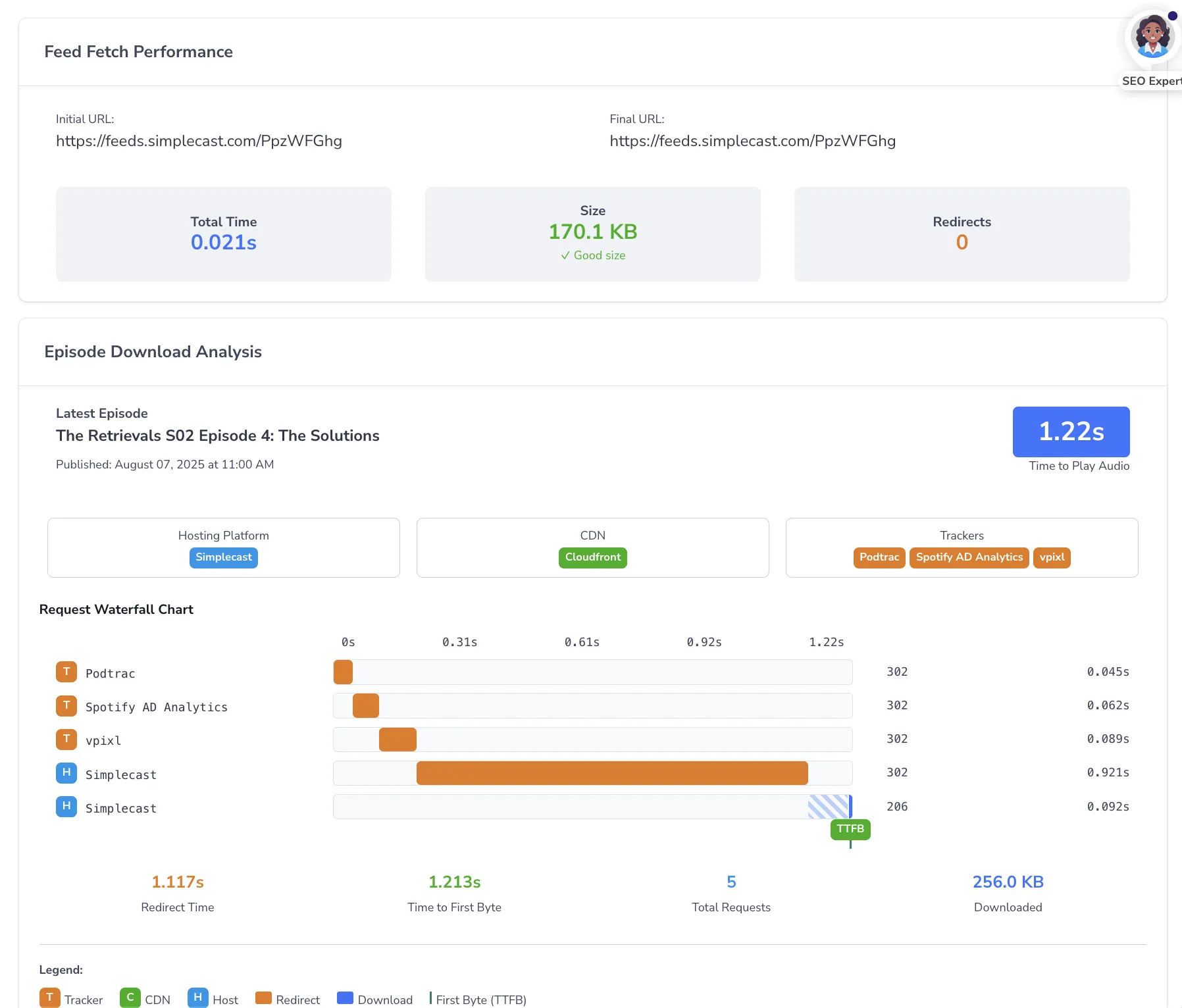
A core part of this page is the Feed Fetch Performance panel, which measures how quickly your feed actually loads — and what it has to go through to get there.
Every analytics tracker or ad-insertion service you add to your feed creates a redirect — an extra hop between a directory requesting your feed and actually receiving it. Stacking multiple redirects slows things down, inflates your feed size, and can cause failures on some platforms.
This panel shows:
- Initial and final URL — Where the request starts and where it ends up after any redirects
- Redirect chain — Each hop in the chain, with its response status and the time that hop took, so you can see exactly where delay is being introduced
- Total time — How long the whole fetch took from start to finish
- Feed size — Your feed file size, graded so you can tell at a glance whether it's a good size, getting large, or too large
- Redirects — The total number of hops in the chain
If you see a long redirect chain or slow total time, review which tracking services are still necessary and remove any you no longer use. For a deeper look at why this matters, see our academy article on why multiple podcast trackers are a recipe for disaster.
How to Use Distribution Health
- Start with the feed status. Confirm your feed reads as Well-Formed and that your valid episode count matches what you expect. A Malformed feed is the most important thing to fix.
- Work through any errors, then warnings. Errors can block distribution, so address those first; warnings are cleanup you can schedule.
- Check your fetch performance. If your total fetch time is high or your redirect chain is long, trim trackers you no longer need and consider whether your feed size is creeping into "large" territory.
- Confirm your platform listings and website. Make sure each Primary distribution row is green, add any missing listing with Add URL manually, merge duplicate listings, and claim a custom website if you don't have one yet.
- Take fixes to your host. Many feed-level changes are made through your podcast hosting platform, so use the specific issues listed here as your checklist when you update your settings.
Best Practices for Distribution Health
Check After Changes
Revisit Distribution Health after you change your hosting setup, update metadata, or add or remove a tracker. This is the fastest way to confirm a change had the effect you intended and didn't introduce a new issue.
Keep Your Redirect Chain Short
Each tracker you stack onto your feed adds time and size. Periodically prune services you no longer use — a shorter chain means faster loads and fewer chances for playback failures.
Consolidate to a Single Clean Feed
Multiple active or duplicate feeds can split your stats and send directories to the wrong place. Aim for one clear primary feed that every app follows.
Claim Your Own Website
If Distribution Health flags a missing custom website, it's worth acting on. A dedicated site gives your show indexed pages and a presence that doesn't depend on any single platform.
Working with Other PodSEO Features
A healthy, fast-loading feed supports everything else you do in PodSEO. Clean metadata strengthens the keyword work you do in Keyword Strategy, and reliable distribution underpins the discoverability you track in Visibility Progress. You can also see a quick distribution summary on the Overview tab, with a link straight back into this tab when you want the full diagnostic.
Getting Started: Open the Distribution tab, expand Check feed health, click Run feed check, and review your feed status, any issues found, and your fetch performance. Use the specific issues listed there as a checklist when you make changes through your podcast host.