
OP3 download data
OP3 is an independent download measurement service. When your podcast feed uses its prefix, PodSEO displays the available public OP3 measurements in Analytics → Tracker. This is different from the keyword Tracker under Search Visibility.
There is no private account connection to authorize in PodSEO. The Tracker source appears when the feed has an active OP3 report; it is not shown for every podcast. OP3 data is public, unlike hopr.fm reports.
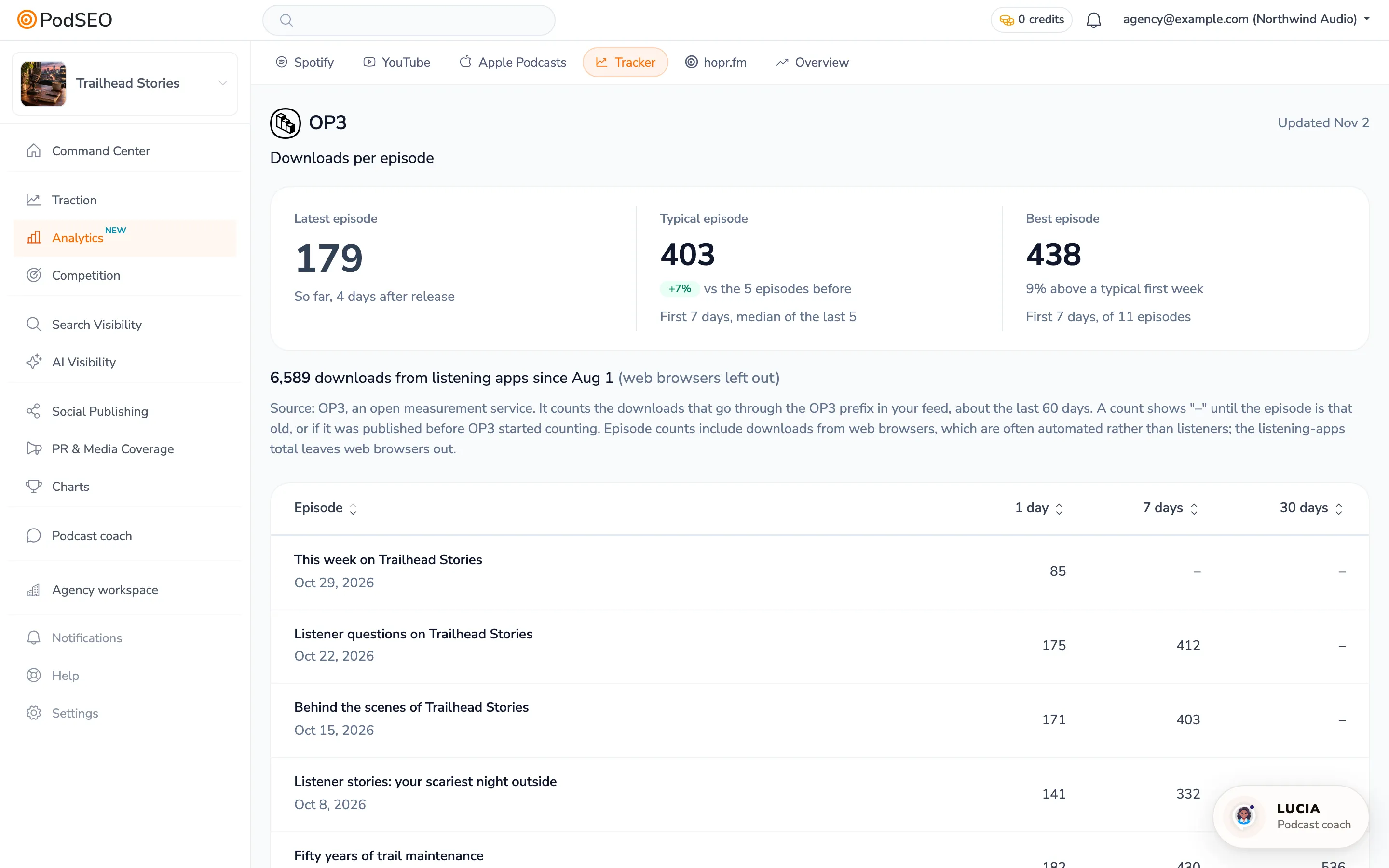
Compare launches at the same age
The 1 day, 7 days and 30 days columns describe downloads after each episode's release, rather than downloads in one shared calendar period. Use the same column to compare complete launches.
- Latest episode shows its first week when complete, or a labelled running total for a newer episode where available.
- Typical episode uses the median first-week performance of the recent complete episodes shown by the report. Its comparison, when available, is against the preceding group.
- Best episode shows the highest complete first-week count among the available episodes. Read the label to see how many episodes are included.
Click a column heading to sort episodes by release order or by its first-day, first-week or first-month count. On mobile, use Sort episodes. Sorting rearranges the available rows; it does not fetch a longer history.
Understand “–” and the history window
OP3 provides about 60 days of download history. A launch count stays “–” when an episode is too young to complete that interval, was published before OP3's observed coverage, or has no complete count available. The update also needs time to include the completed interval. “–” is not zero and is not a partial count presented as a full launch.
An older episode can therefore have fewer available columns than a newer one. Do not assume that adding the prefix today recovers earlier downloads. Check the Updated date and compare only available, complete measurements.
Listening apps versus episode counts
The downloads from listening apps since … line excludes web browsers. The per-episode counts include browser downloads, which can contain automated requests. These two figures also have their own windows; they are not expected to add up or match.
PodSEO's OP3 page is a launch comparison table. It does not offer the same daily request investigation, exclusion controls or private audience reports as hopr.fm. For those reports, see hopr.fm analytics.
If the Tracker tab is missing
Check that your host publishes the OP3 prefix in the feed's episode links and that OP3 has started reporting downloads. A prefix added only to future episodes will not give complete earlier launches. PodSEO detects supported prefix data from the feed; there is no Connect OP3 sign-in button.
Removing the prefix in your host stops routing future requests through OP3. It does not make previously public OP3 data private. For the other available measurements, see Analytics and Hosting platform analytics.