
Rankings
Compare search positions for the keywords you already track. Rankings brings the show and episode views together, so you can check whether a phrase finds your whole podcast, particular episodes, or both.
To access: Search Visibility → Rankings, then select Show or Episodes. These are modes of one tab, rather than separate top-level tabs.
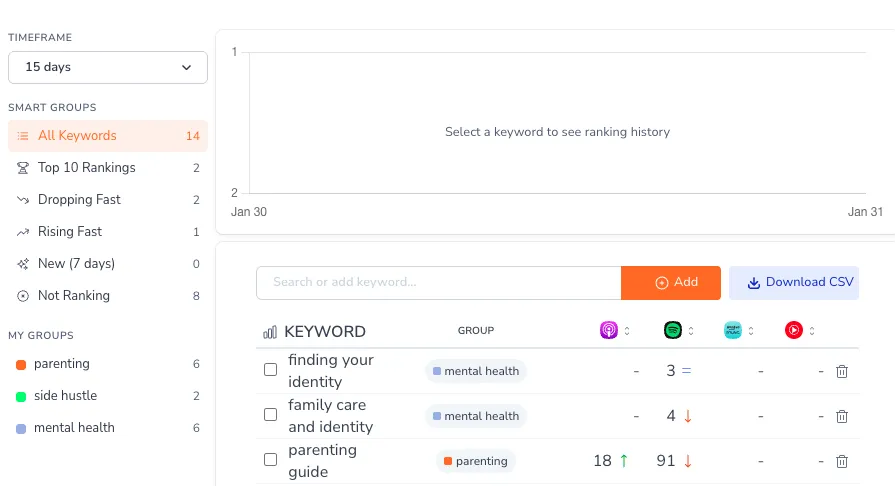
Choose the right view
| Mode | What it answers | Full guide |
|---|---|---|
| Show | Where does my podcast rank for each tracked keyword across the listening platforms? | Show rankings |
| Episodes | Which episodes rank for each tracked keyword on Apple Podcasts and Spotify? | Episode rankings |
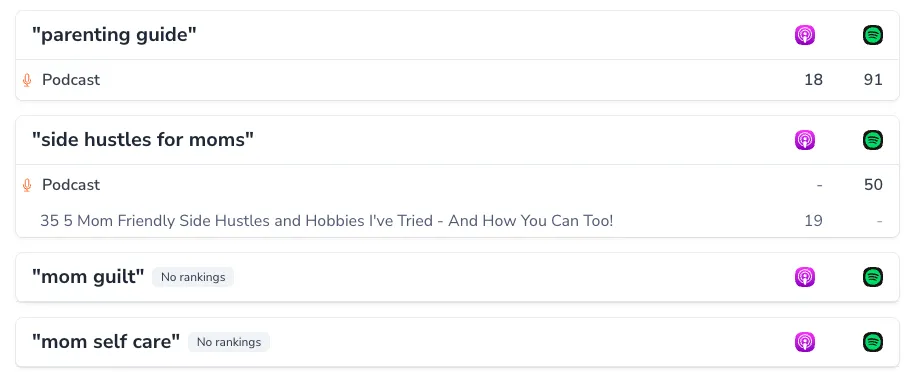
Start with Show to compare platforms. Switch to Episodes to see which content is carrying a term. A dash or an empty result means there is no observed rank for that item in the view; it isn't a traffic count.
Rankings, Organic Visibility, or Tracker?
- Strategy is where you choose and assign your keywords.
- Organic Visibility discovers terms your show or episodes already rank for, including terms you haven't chosen to track.
- Rankings compares positions for your tracked terms in Show or Episodes mode.
- Tracker follows the history of a tracked keyword, with platform, country, and timeframe filters and competitor comparisons.
Use Strategy to add a missing term. Tracking a keyword doesn't assign it to the show or an episode; choose its target there when you want it to guide optimization.
Availability
The full Show and Episodes ranking views require a paid plan. Free users can use Tracker for their tracked terms and see the limited preview offered in Rankings.