
Show optimization
Improve the title, author, description, and cover for your whole podcast. Use this page to check how well your show metadata matches your show keywords, then apply useful changes in your podcast host.
To access: Command Center → Show optimization. Episode titles, descriptions, and covers are in Planner.
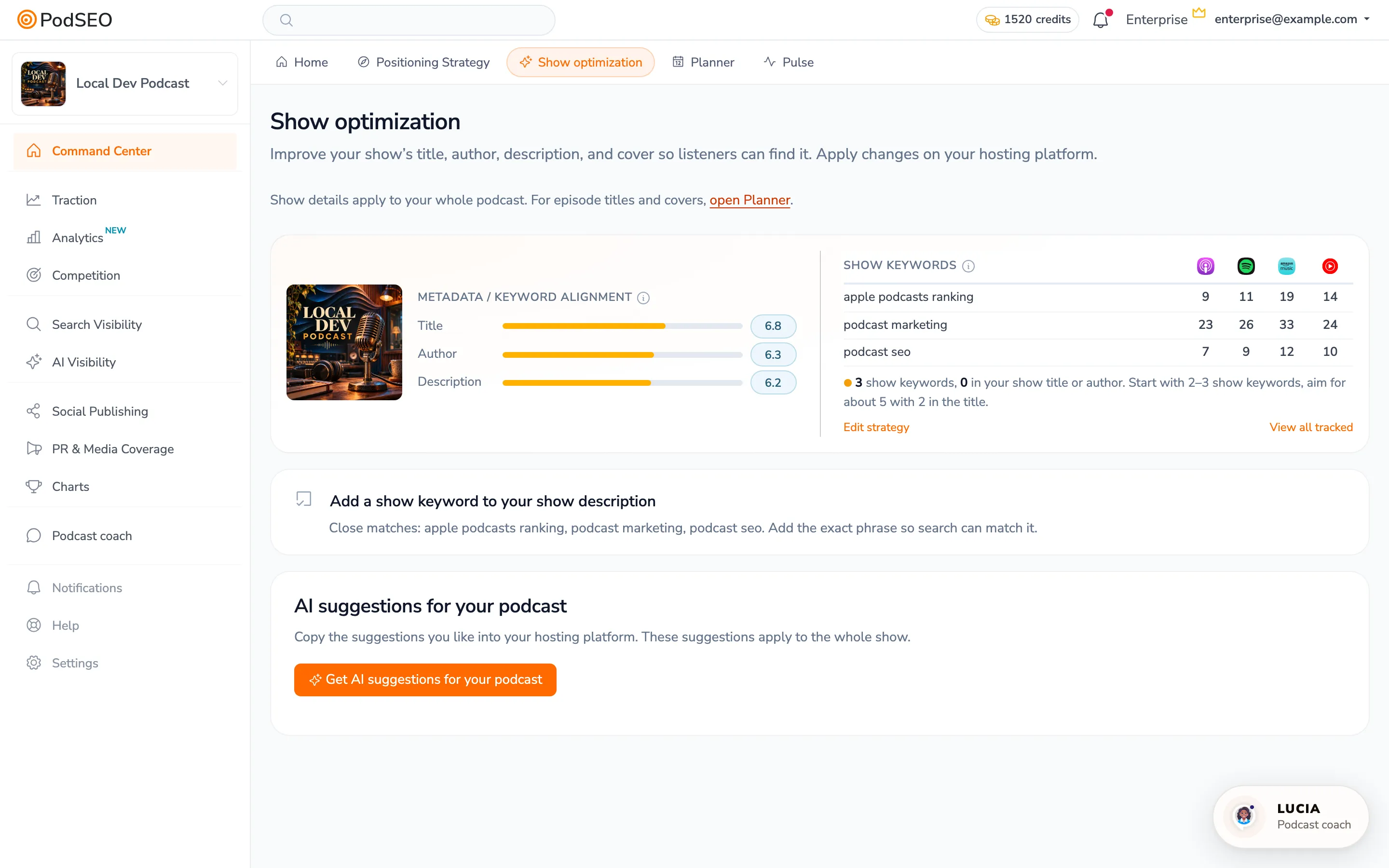
Check your show keywords first
Open Search Visibility → Strategy and assign relevant terms to Show. These phrases guide title and author alignment. Description alignment and suggestions also consider your Unassigned keywords. Keywords assigned only to an episode, your brand, a guest, or a competitor do not become show targets.
Start with two or three relevant show keywords. The on-screen guidance helps you build a focused strategy; it is not a separate keyword allowance.
Read the alignment card
Metadata / Keyword Alignment checks your Title and Author against show keywords. Description alignment also considers Unassigned keywords. Review the explanations alongside the scores to see what is missing. Cover analysis, when available, is shown with the artwork.
The adjacent Show keywords rankings table shows how your show ranks for those phrases across the listening platforms. Use Edit strategy to change your targets or View all tracked to inspect your tracked terms.
A good alignment score means your metadata represents your targets. It does not guarantee a search position, downloads, or a larger audience.
Get suggestions and apply changes
- Review your current show keywords and metadata.
- On a paid plan, click Get AI suggestions for your podcast.
- Review the proposed changes and keep the wording that accurately describes your show.
- Copy your chosen title, author, or description into your podcast host and save it there.
- After the updated information reaches the listening platforms, check your rankings in Tracker.
Saving a suggestion or editing a draft in PodSEO does not rewrite your live feed. Apply live metadata changes through your host. If the page gives you a description task, open it for the exact phrase and verification steps.
Show optimization or Planner?
| What you want to improve | Where to work |
|---|---|
| The podcast's title, author, description, or show cover | Command Center → Show optimization |
| One episode's title, description, keywords, or cover | Command Center → Planner, then open the episode |
| Which phrases the show or an episode should target | Search Visibility → Strategy |
| Whether a change improved a tracked search position | Search Visibility → Tracker |
Availability
Show-keyword alignment covers the title, author, and description. AI metadata suggestions and the paid analysis features require a paid plan. Your plan's keyword allowance still applies.
For the complete sequence from positioning to measuring results, follow the PodSEO workflow.