
Connect Podbean
If your podcast is hosted on Podbean, you can bring its downloads into PodSEO. Podbean only lets you share your own statistics through an app that you register in your Podbean account, so the connection takes two keys: you create a small app on Podbean's developer site (a couple of minutes, free), then paste its Client ID and Client Secret into PodSEO. Once connected, your Podbean downloads appear in Analytics next to your other sources, per day and per episode, and refresh daily.
The connection is free on every plan, Podbean's and PodSEO's. In an organization, only Admins and Owners can connect a source in PodSEO; other team members can view the numbers.
Before you start
- Use the Podbean account that hosts the show. The app you register can only read the podcasts of the account it belongs to. If your account holds several podcasts, one app covers all of them: PodSEO picks the one you are connecting.
- No coding is involved. "App" is just Podbean's name for a pair of keys. You don't need to build or install anything.
- Keep PodSEO open in another tab. You'll paste the two keys into the Podbean tab in Analytics.
Step 1: Open the Podbean tab in PodSEO
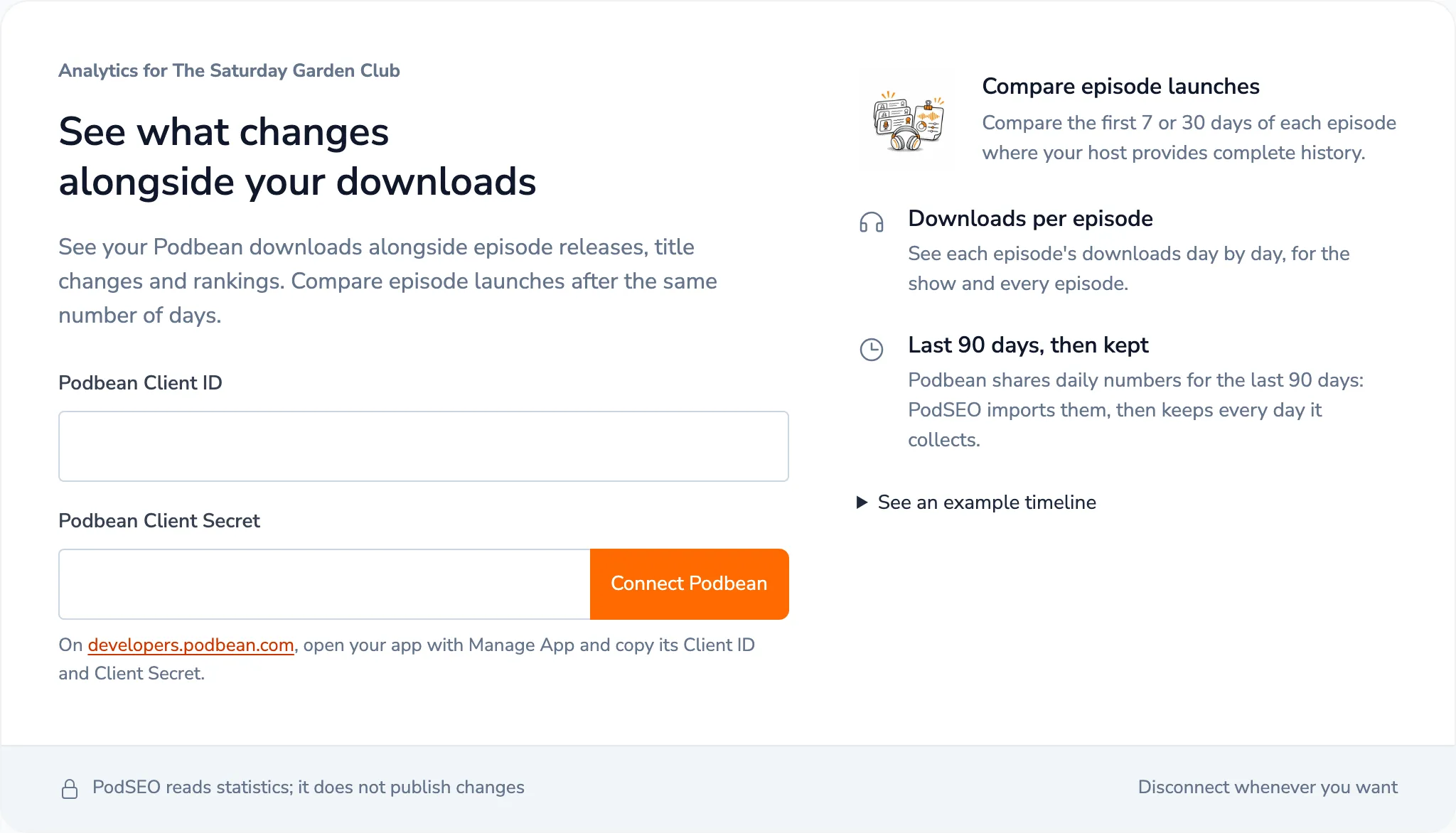
Choose your podcast, open Analytics and select the Podbean tab. The connection card shows two fields, Podbean Client ID and Podbean Client Secret, and the same steps as this guide.
Step 2: Register an app on Podbean
- Go to developers.podbean.com and click Register a new app.
- Sign in with the Podbean account that hosts your show, if Podbean asks you to.
Podbean opens the registration form.
Step 3: Fill in the form
| Podbean field | What to enter |
|---|---|
| Company Name | Your name or your show's name |
| Developer Contact Name | Your name |
| Contact Email | Your email address |
| App Name | PodSEO (any name works; this one helps you recognise it later) |
| App logo | Any square image, if Podbean asks for one |
| Redirect URI (Development) | Leave empty |
| Redirect URI (Production) | Leave empty |
Then click Submit.
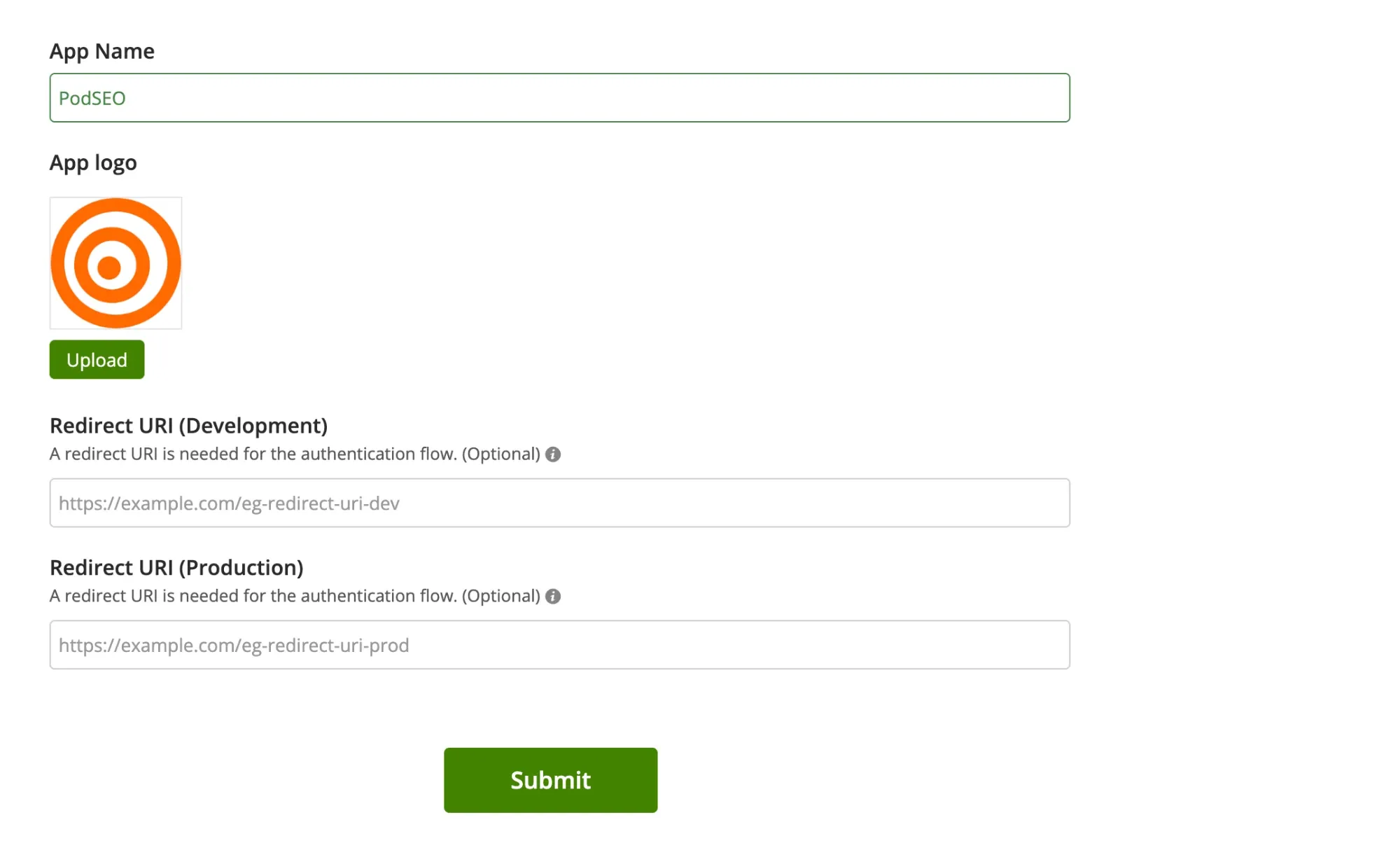
The Redirect URIs are only needed by services that ask you to sign in through Podbean. PodSEO uses your keys directly, so leave them empty.
Step 4: Copy the Client ID and Client Secret
Back on developers.podbean.com, click Manage App next to the app you just created. Copy the Client ID and the Client Secret.
Step 5: Paste the keys into PodSEO
- In PodSEO's Podbean tab, paste the Client ID in Podbean Client ID and the Client Secret in Podbean Client Secret.
- Click Connect Podbean.
PodSEO checks the keys and finds your show among the podcasts of the account. Your downloads appear after the first import, usually within a few minutes, then update daily. See Hosting platform reports to read them.
What PodSEO can see
Podbean shares daily downloads for the last 90 days. PodSEO imports those days when you connect, then keeps every day it collects from then on, so your history in PodSEO grows past 90 days over time. Episodes published more than 90 days before you connected show their downloads from the connection date onward.
Podbean's keys cannot be limited to reading: an app's keys could also edit your podcast. PodSEO stores them encrypted, only reads download statistics, and never publishes, edits or deletes anything on Podbean.
Troubleshooting
The Podbean tab is missing. Check that you selected the right podcast. The tab appears for shows whose feed PodSEO recognises as hosted on Podbean.
"Podbean refused these keys." The Client ID or the Client Secret was copied incompletely, or belongs to another app. Open Manage App on developers.podbean.com and copy both again. Check for spaces at the start or end.
"This Podbean account hosts … not this podcast." The app belongs to a different Podbean account than the one that hosts the show. Sign in to Podbean with the account that hosts it, register an app there, and use its keys.
PodSEO says Podbean no longer accepts the connection. This happens when the app was deleted on developers.podbean.com, or its keys changed. Copy the current keys (or register a new app) and paste them in the form shown on the Podbean tab. Numbers already shown keep their original dates.
Still stuck? Contact support with your show's name. Never send your Client Secret or your Podbean password.
How to disconnect
- In PodSEO, open Settings → Connections, expand Podbean for the correct show and choose Disconnect…. PodSEO stops reading your downloads and deletes the keys it stored. Your Podbean numbers no longer show anywhere in PodSEO; PodSEO keeps them for when you reconnect.
- To invalidate the keys themselves, delete the app on developers.podbean.com.
Related guides
- Connect your analytics: every source you can connect, and how to manage them
- Hosting platform reports: read your host's downloads, episodes and audience
- Reading Analytics: compare Podbean downloads with Apple, Spotify and YouTube